
The design world is experiencing a deliberate rebellion against algorithmic polish. As AI-generated visuals flood the internet with their characteristic smoothness and perfection, designers are reaching for the exact opposite: messy collages, patchwork compositions, and mixed-media maximalism that screams "a human made this."
This shift toward patchwork and collage aesthetics isn't just a trend—it's a creative response to algorithmic sameness. According to design forecasters, mixed media maximalism is borrowing from scrapbooks, photo dumps, and collages as a way to inject personality and tactile authenticity into digital work.
But here's the challenge: creating authentic collage work requires resources. The good news? You don't need expensive software or premium asset libraries to participate in this aesthetic movement. This guide covers the best free resources for patchwork and collage design that help you embrace imperfection and stand out from AI-generated uniformity.
Why Patchwork and Collage Define Anti-AI Design in 2026
Before diving into resources, it's worth understanding why this aesthetic matters right now.
The anti-AI design movement celebrates handcrafted techniques including physical collage, stitched texture, and tactile materials. It's a direct rejection of the smooth, predictable output that AI tools tend to produce. Patchwork compositions—with their visible seams, mismatched elements, and intentional roughness—communicate authenticity in ways that algorithmically perfect designs simply can't.
This aesthetic embraces:
- Visible imperfection: Rough edges, misaligned elements, and asymmetry that feel human
- Mixed media layering: Combining photography, illustration, texture, and typography in unexpected ways
- Scrapbook energy: The spontaneous, personal quality of analog collage work
- Tactile materiality: Visual evidence of physical processes, even in digital work
For designers looking to create work that feels genuinely handmade, we covered strategic approaches in our guide on how to design anti-AI aesthetics without traditional skills.
 Example of vibrant collage composition with mixed photography. Source: Canva
Free Collage Maker Tools
Photopea: The Photoshop Alternative in Your Browser
Photopea (photopea.com) is a completely free, browser-based image editor that rivals Photoshop in capability. For collage work, it's exceptional because:
- Full layer support with blending modes perfect for creating complex compositions
- Masking tools for seamless (or intentionally rough) element integration
- No account required, works entirely in-browser
- Supports PSD files if you need to collaborate with Photoshop users
Best for: Designers who want professional-level control over layering, masking, and blending without subscription costs.
BeFunky Collage Maker
BeFunky offers a dedicated collage maker with both structured grid layouts and freeform canvases. The free tier includes:
- Drag-and-drop collage creation with flexible layouts
- Texture overlays and vintage effects that add tactile quality
- Background removal tools for isolating collage elements
- Basic photo editing to adjust individual elements
While the interface leans toward simplicity, it's perfect for quick collage compositions and scrapbook-style layouts.
 BeFunky's collage maker interface showing grid-based layout options. Source: BeFunky
Canva's Collage Templates
Canva provides extensive free collage templates that work surprisingly well for anti-AI aesthetics when used creatively. The free plan includes:
- Hundreds of collage layouts designed for various formats
- Photo editing and filter tools built-in
- Element libraries with geometric shapes, frames, and dividers
- Export options including PNG and PDF
Pro tip: Instead of using Canva's templates exactly as designed, treat them as starting points. Delete elements, intentionally misalign photos, overlap frames in unexpected ways, and add texture overlays to create that authentic patchwork feel.
Fotor Collage Maker
Fotor offers a free collage maker with both classic grid layouts and artistic templates. Notable features include:
- Funky collage templates that lean into maximalist aesthetics
- Customizable spacing and borders between elements
- Built-in photo enhancement tools
- Background patterns and textures
The free version includes watermarks on some templates, but many basic collage layouts remain completely free to use commercially.
Free Texture and Material Resources
Authentic patchwork design relies heavily on textured, tactile elements. These free resources provide the raw materials for layering:
Texture Libraries for Layering
Textures.com Free Tier: Offers 15 free credits daily, enough for downloading several high-quality textures including paper, fabric, concrete, and aged materials perfect for collage backgrounds.
Lost & Taken: A curated collection of free high-resolution textures created from scanned materials, film grain, and weathered surfaces. Excellent for adding authentic analog quality to digital collages.
Subtle Patterns: While known for seamless repeating patterns, this library includes paper textures and fabric patterns that work beautifully as collage backgrounds or overlay elements.
For more comprehensive texture resources specifically designed for anti-AI aesthetics, check out our guide to best free texture resources for anti-AI design aesthetics in 2026.
Paper and Scrapbook Materials
Rawpixel Public Domain: This massive collection includes thousands of free vintage illustrations, aged paper textures, botanical prints, and ephemera perfect for collage compositions.
Internet Archive: The public domain collections include scanned vintage magazines, book pages, and historical documents that add authentic aged quality to collage work.
Old Book Illustrations: A specialized resource offering high-resolution scans of illustrations from 19th and early 20th century books, all in the public domain.
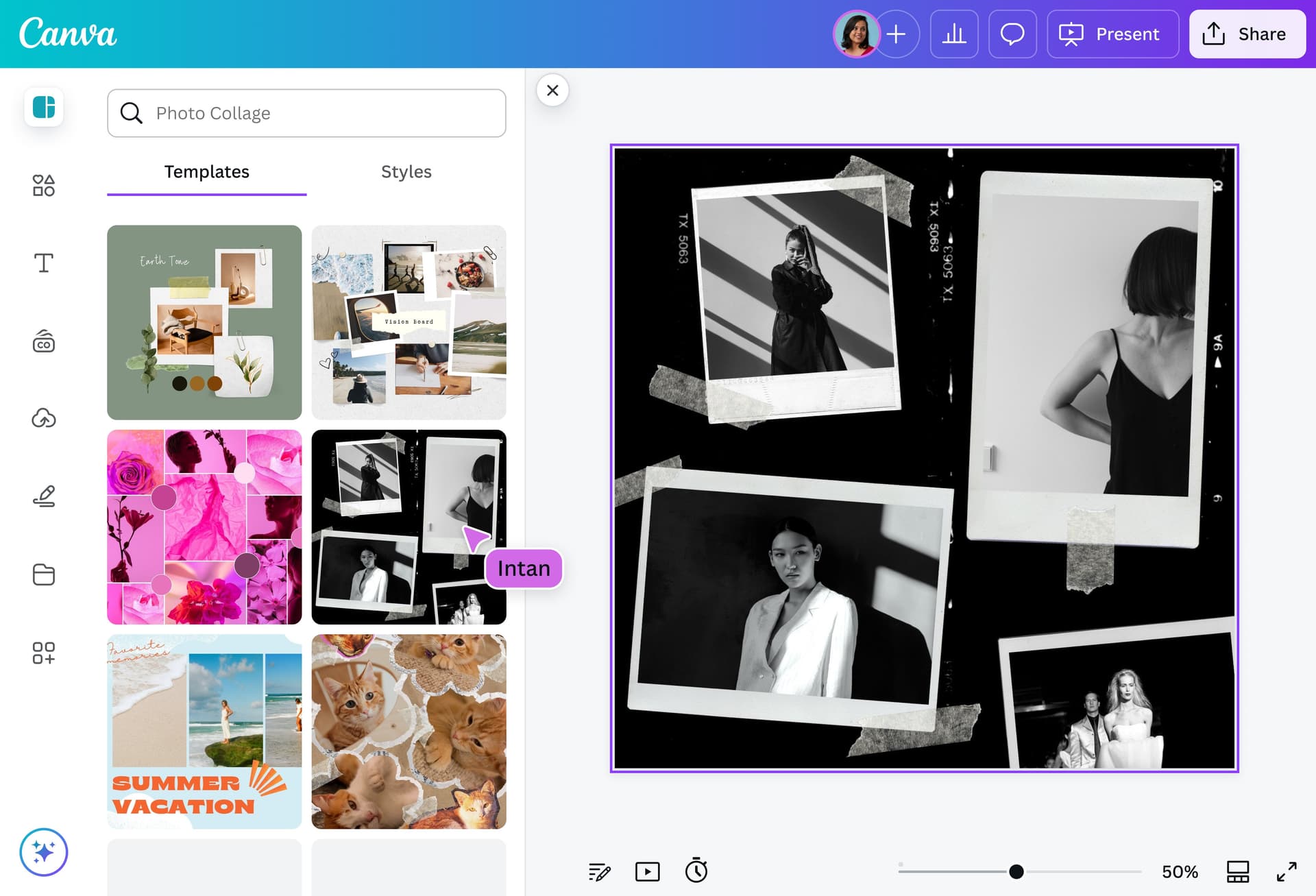 Creating layered photo collages with varied textures and compositions. Source: Canva
Specialty Resources for Patchwork Aesthetics
Typography and Text Elements
Google Fonts: Beyond standard typefaces, look for fonts that feel handmade or imperfect. Try "Caveat," "Indie Flower," "Permanent Marker," or "Amatic SC" for handwritten qualities that complement collage aesthetics.
DaFont Free Section: Thousands of free fonts including distressed, hand-drawn, and irregular typefaces perfect for adding personality to collage compositions.
Vintage and Retro Elements
Vecteezy Free Vector Graphics: While primarily vector-focused, the free tier includes retro design elements, vintage badges, and decorative frames that layer beautifully in collage work.
Freepik Free Resources: Offers cutout elements, vintage illustrations, and decorative graphics. The free tier requires attribution but provides extensive resources for mixed-media compositions.
Photo Resources with Character
Standard stock photos often feel too polished for authentic collage work. These alternatives offer more character:
Unsplash: High-quality photography that often includes grain, natural lighting imperfections, and authentic moments rather than overly staged compositions.
Pexels: Similar to Unsplash with extensive free photography, particularly good for candid shots and natural textures.
Barn Images: Specializes in authentic, unpolished photography with vintage processing and film-like qualities.
Strategic Workflows for Patchwork Design
Having resources is one thing; knowing how to use them strategically is another. Here's how to approach patchwork and collage creation:
The Layering Approach
- Start with texture: Begin your composition with a textured background—scanned paper, fabric, or concrete
- Add photographic elements: Layer in photos, but crop them irregularly and let edges show
- Introduce illustration or drawing: Mix media types—combine photography with hand-drawn elements or vintage illustrations
- Typography last: Add text elements that feel handwritten or imperfect
- Apply final texture overlays: Add grain, dust, or paper texture over the entire composition for cohesion
The Physical-Then-Digital Workflow
For maximum authenticity, many designers are combining analog and digital processes:
- Create physical elements: Print photos, tear or cut them by hand, arrange on a surface
- Scan the composition: Use a flatbed scanner or phone scanning app to digitize
- Refine digitally: Clean up, adjust colors, add additional digital layers if needed
- Export with texture: Add final grain or paper texture to emphasize the handmade origin
This hybrid approach creates collages that genuinely were touched by human hands, adding legitimacy to the anti-AI aesthetic.
The Intentional Imperfection Method
The key to authentic patchwork design is embracing mistakes as features:
- Don't align perfectly: Let elements sit slightly crooked or overlapping
- Show the seams: Make transitions visible rather than seamlessly blended
- Mix resolutions: Combine high-res and lower-res elements for varied visual texture
- Vary color treatment: Process different photos differently—some black and white, some color, some with vintage filters
For more on building visual systems around intentional imperfection, see our article on how to design imperfect by design visual systems.
Creating Brand-Consistent Collage Work
While embracing spontaneity and imperfection, professional designers still need collages that feel on-brand and cohesive across touchpoints. This is where strategic thinking meets creative chaos.
illustration.app excels at helping designers maintain visual consistency even within maximalist, collage-heavy aesthetics. While traditional collage tools give you complete freedom (and sometimes chaos), illustration.app generates coordinated illustration elements that can be integrated into your patchwork compositions while maintaining brand coherence.
For projects requiring both the authentic energy of collage and the consistency of brand design, use this hybrid approach:
- Generate cohesive illustration sets from illustration.app that match your brand palette
- Use these as anchor elements in your collage compositions
- Layer in found textures, photography, and vintage materials around these branded elements
- The result feels spontaneous and handmade while remaining unmistakably your brand
This approach gives you the best of both worlds: the tactile rebellion of anti-AI aesthetics combined with professional brand consistency.
 Uploading and arranging multiple images in a collage maker. Source: Fotor
Free Tools for Adding Handmade Effects
To push your collages further into authentic anti-AI territory, these free tools add crucial handmade qualities:
GIMP
The free, open-source alternative to Photoshop offers powerful tools for:
- Custom brush creation for painted or sketched effects
- Layer blending for complex collage compositions
- Distortion filters for adding organic irregularity
- Extensive plugin ecosystem including vintage effect filters
Krita
While primarily designed for digital painting, Krita is exceptional for adding hand-drawn or painted elements to collage work:
- Natural media brushes that create authentic brush strokes
- Texture painting capabilities
- Layer management for complex compositions
- Completely free with no watermarks or limitations
Inkscape
For vector-based collage elements, Inkscape provides:
- Hand-drawn path tools that create imperfect, organic shapes
- Bitmap tracing for converting photos into stylized vector elements
- Geometric shape tools that can be distorted and irregularized
- Free and open-source with professional capabilities
For designers working specifically with hand-drawn aesthetics, we've covered the best free hand-texture brush packs for digital illustration in 2026, which includes brushes perfect for adding sketchy, tactile elements to collage compositions.
Making Collages Work Across Applications
Anti-AI patchwork aesthetics aren't limited to single compositions. Here's how to extend this approach across different design applications:
Social Media Graphics
Collage aesthetics work exceptionally well for social media where authenticity and personality cut through algorithmic feeds. Use patchwork compositions for:
- Instagram carousel posts with varied, mismatched layouts
- Story templates that feel scrapbook-inspired
- Pinterest graphics with vintage ephemera and layered elements
Editorial and Publication Design
Magazine layouts, blog headers, and article illustrations benefit from collage's visual interest:
- Create mastheads with layered typography and texture
- Design pull quotes with torn paper effects and mixed media
- Build section dividers using photographic collage elements
Brand Identity Applications
While logos themselves typically require clarity, brand systems can embrace patchwork aesthetics in:
- Marketing materials and campaign graphics
- Packaging design with layered label elements
- Website hero sections with collage-style compositions
- Presentation templates with mixed-media backgrounds
The Philosophy Behind Anti-AI Collage Work
Understanding the "why" makes your collage work more intentional and effective. The anti-AI movement isn't about rejecting technology—it's about asserting human creativity and imperfection as valuable qualities.
Naïve design and distorted imagery celebrate imperfection and human error as direct responses to algorithmic perfection. When you create a collage with visible seams, misaligned elements, and varied textures, you're making a statement: this wasn't mass-produced by an algorithm. A human chose these elements, arranged them, and left evidence of their touch.
This philosophy extends beyond technique to intent. The best anti-AI collage work feels:
- Personal: Like it could only have been made by you, with your specific choices
- Temporal: Captured in a specific moment, not timeless and algorithmic
- Imperfect: Showing evidence of process and human decisions
- Layered: Revealing history, iteration, and thought through visible elements
Practical Tips for Free-Resource Collage Creation
Working with free resources requires some strategic thinking to achieve professional results:
Quality Over Quantity
You don't need hundreds of elements. Often, 5-10 carefully chosen textures, photos, and graphic elements create more compelling compositions than throwing everything together.
Develop a Personal Archive
As you discover free resources you love, organize them. Create folders for:
- Paper textures by color and age
- Vintage illustrations by subject
- Photographic elements by theme
- Typography favorites
This personal library becomes your collage toolkit, making future projects faster.
Export Settings Matter
When working with layered, textured collages, export quality significantly impacts the final result:
- For web use: PNG at 2x resolution minimum to preserve texture detail
- For print: Work at 300 DPI and export as high-quality PDF or TIFF
- Include grain or texture as the final layer to unify disparate elements
Respect Licensing
Most resources listed here are free for commercial use, but always verify:
- Public domain resources (pre-1928 in the US) are completely free
- Creative Commons licenses vary—check requirements
- Free tools like Canva may require attribution on the free tier
- When in doubt, contact the creator or use clearly public domain materials
The Future of Collage in Design
As AI tools become more prevalent, the human touch in collage work becomes more valuable. Design trends for 2026 emphasize texture, warmth, and tactile rebellion against algorithmic sameness.
This isn't a temporary trend—it's a fundamental shift in how designers communicate authenticity. Patchwork and collage aesthetics offer a visual language that AI tools struggle to replicate convincingly. The randomness, the personal choices, the visible evidence of human process—these elements resist automation.
For designers building work in this space, the free resources covered here provide everything needed to create compelling anti-AI aesthetics. The limitation isn't access to premium tools or expensive assets—it's creative thinking and intentional imperfection.
Combining Tools for Maximum Impact
The most effective approach often combines multiple free resources strategically:
For a brand campaign with anti-AI aesthetics:
- Generate cohesive branded illustrations from illustration.app as anchor elements
- Layer in scanned paper textures from Lost & Taken
- Add vintage elements from Rawpixel Public Domain
- Compose in Photopea with intentional misalignment
- Apply final grain texture for cohesion
- Export high-resolution for various applications
This workflow costs nothing beyond the time investment, yet produces work that feels handmade, authentic, and impossible for AI to replicate.
For social media content with patchwork energy:
- Source photos from Unsplash with natural grain and imperfection
- Create layouts in Canva, then intentionally break the grid
- Add handwritten typography from Google Fonts
- Layer texture overlays from Textures.com free credits
- Export with intentional compression artifacts for authentic digital quality
The tools are free; the creativity and strategic thinking are what differentiate your work.
Creating Without Overwhelm
With so many free resources available, it's easy to feel overwhelmed. Start simple:
Week 1: Explore one collage maker (try Photopea or BeFunky) Week 2: Build a small texture library (download 10-15 favorite papers and fabrics) Week 3: Create three experimental collages with no client requirements Week 4: Apply techniques to an actual project with constraints
This gradual approach builds skills without the paralysis of too many options.
The anti-AI aesthetic movement values process over perfection, which means your early experiments are valuable practice. Share work in progress, embrace visible learning, and document your collage process. This transparency itself becomes part of the authentic, human narrative that defines anti-AI design.
Conclusion
The shift toward patchwork and collage aesthetics represents more than a visual trend—it's a philosophical stance about creativity, authenticity, and human value in an AI-saturated landscape. The beauty of this movement is that participation doesn't require expensive tools or premium resources.
With the free resources covered in this guide—from browser-based collage makers to public domain archives to texture libraries—you have everything needed to create work that feels genuinely handmade and defiantly human. The limitation isn't access; it's perspective and willingness to embrace imperfection.
Start building your collage toolkit today. Download a few textures. Experiment with layering in Photopea. Tear up some printed photos and scan them. The anti-AI aesthetic isn't about having the best tools—it's about using whatever tools you have with intention, personality, and visible evidence of your creative choices.
That visible humanity is something no algorithm can generate, and it's becoming the most valuable quality in design.