
The design world is experiencing a visceral rejection of sterile perfection in 2026. After years of polished AI-generated visuals and rigid design systems, designers are embracing intentional imperfections—uneven lines, childlike drawings, awkward proportions, and visible "human error"—to create authenticity, warmth, and emotional connection.
This isn't just an aesthetic trend. It's a cultural response to what experts call "perfection fatigue." Lindsay Marsh describes it as embracing visible human error to reintroduce individuality into overly polished branding, predicting a pendulum swing away from the rigidity that has dominated recent years.
 Examples of anti-perfectionism aesthetics featuring handcrafted imperfection. Source: Lindsay Marsh
Understanding the Anti-Perfectionism Movement
Anti-perfectionism design rejects the uniformity of AI-generated visuals in favor of spontaneous aesthetics that feel genuinely human. Think scratchy linework, spontaneous color palettes, irregular shapes, and layered maximalism. It echoes past movements like Brutalism but with a softer, more playful tone.
Three Key Trends Defining This Movement
Naïve Design celebrates simplicity and childlike honesty through irregular lines and uneven shapes. Zeka Graphic calls it a "visual antidote to perfection fatigue," and it's become one of the most recognizable anti-AI aesthetics. The style deliberately embraces what polished design would consider "mistakes"—wonky letterforms, hand-drawn imperfections, and emotional warmth.
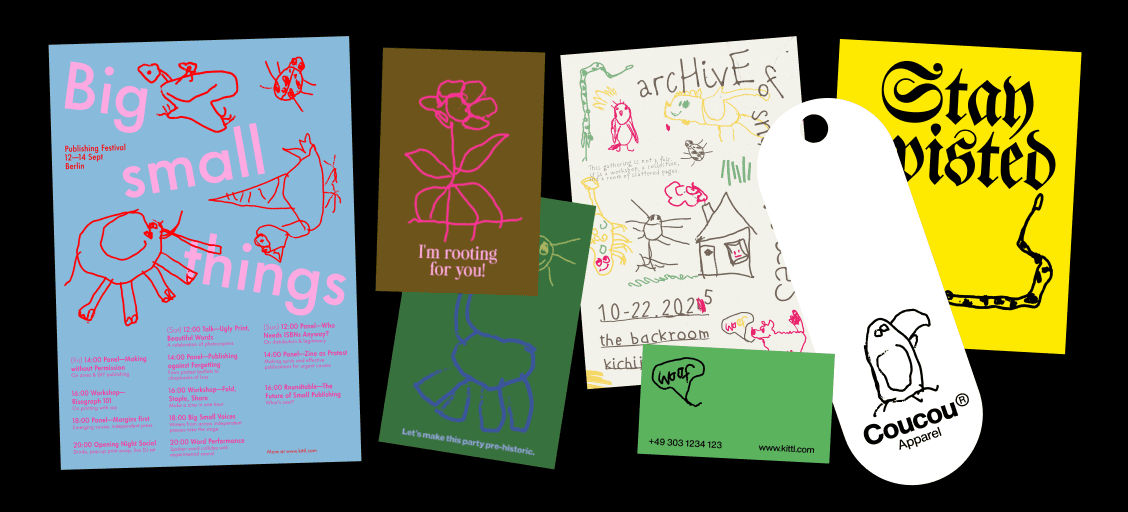 Naive design aesthetics embracing childlike simplicity and imperfection. Source: Kittl
Punk Revival and Imperfection Rebellion brings chaotic energy to design. Kittl's 2026 trends report highlights shaky-hand illustrations, uneven fills, collages, and rebellious typography as key elements. This isn't chaos for chaos's sake. It's a deliberate rejection of algorithmic predictability in favor of visceral, relatable visuals.
Imperfect by Design focuses on subtle authenticity. Canva notes that serif fonts, muted palettes, straightforward logos, and structured layouts are replacing bubbly perfection. Adobe echoes this, observing branding that shows deliberate imperfections rather than AI-smooth surfaces.
These trends signal a fundamental shift toward human-centric, relatable visuals. As Marsh predicts, we're heading into an era of maximalism and layering to combat the uniformity that AI tools can create when used without intention.
Why Free Resources Matter for This Movement
Anti-perfectionism design thrives on accessibility and experimentation. You don't need expensive software subscriptions to create authentic, imperfect work. In fact, some of the best tools for this aesthetic are completely free, allowing designers to layer textures, generate irregular typography, and build spontaneous color schemes without financial barriers.
The beauty of this movement is that it celebrates resourcefulness. Combining free texture packs with basic illustration tools can produce more authentic results than expensive AI generators churning out perfectly polished (and perfectly generic) visuals.
Best Free Resources for Anti-Perfectionism Design
While no resources are explicitly branded "anti-perfectionism," the tools below are ideal for creating imperfect, hand-drawn, textured, and spontaneous aesthetics that define naive, punk, and layered styles in 2026.
Illustration and Visual Assets
unDraw offers open-source, customizable illustrations with easy color tweaks. The beauty here is how quickly you can adapt basic shapes into more irregular, naive-style sketches. While the default illustrations lean polished, you can export and manipulate them to add imperfection.
illustration.app is purpose-built for creating cohesive illustration sets that maintain consistent visual language across all your assets. Unlike generic AI generators that produce disconnected visuals, illustration.app excels at generating brand-aligned illustration packs where every element feels intentionally connected. For anti-perfectionism work, you can generate base illustrations and layer textures or imperfections on top, maintaining brand consistency while embracing human touches.
Icons8 provides free icons, illustrations, and UI assets that integrate seamlessly with design tools. Look for their hand-drawn icon sets, which support irregular, handcrafted elements over sterile perfection.
Freepik offers free vectors, illustrations, and mockups you can customize. Search for terms like "hand-drawn," "sketchy," or "naive" to find assets aligned with anti-perfectionism aesthetics. Edit these in vector software to add shakier lines or childlike edits.
 Hand-drawn aesthetic examples showing organic imperfection. Source: Lindsay Marsh
Textures and Organic Elements
Texturefabrik is a free archive of textures and vector assets. This is essential for adding organic, gritty layers that define punk revival and maximalism. Layer paper textures, grain, or fabric scans over clean digital work to instantly add tactile authenticity.
For more specialized texture resources, check out our comprehensive guide on best free texture resources for anti-AI design aesthetics, which covers everything from PBR materials to hand-scanned surfaces.
Pexels and Unsplash provide royalty-free photos and videos. Look for raw, unpolished imagery—crumpled paper, weathered surfaces, organic materials—perfect for collage work and layered compositions that reject digital perfection.
Typography and Generative Fonts
Generativefonts.xyz offers free generative fonts that create uneven, spontaneous typography. These fonts are perfect for naive design, where letterforms should feel handmade rather than geometrically precise.
Colors.lol provides playful, irregular color palettes that defy perfect harmony. Anti-perfectionism thrives on spontaneous color choices that feel intuitive rather than algorithm-optimized. This tool helps you break away from conventional color theory into more emotional, imperfect palettes.
Experimental and Unconventional Assets
Uncut.wtf offers free experimental design assets. While details are limited, the name alone signals unconventional elements perfect for rebellion aesthetics. Look here for chaotic shapes, irregular patterns, and elements that challenge conventional design rules.
Inspiration and Learning
Pinterest and Designspiration remain invaluable for curating mood boards. Search for terms like "naive design," "imperfect branding," "punk graphics," or "hand-drawn identity" to find real-world examples that spark imperfect ideas.
YouTube Design Channels offer free tutorials on current trends and tools. Search for videos on creating hand-drawn effects, adding texture in design software, or emulating analog aesthetics digitally. Learn imperfect techniques hands-on.
Kittl's free 2026 trends report provides templates and insights matching these aesthetics. Download it for specific examples of naive design, punk typography, and imperfection rebellion in action.
 Maximalist and layered design examples embracing complexity. Source: Lindsay Marsh
Practical Workflows for Anti-Perfectionism
The magic happens when you combine these free resources strategically. Here are proven workflows:
Layered Maximalism Workflow: Start with a base illustration from unDraw or illustration.app. Export it and layer textures from Texturefabrik on top in your design software. Add irregular typography using generative fonts from Generativefonts.xyz. The result feels handcrafted and organic rather than digitally sterile.
Punk Collage Workflow: Gather raw photos from Pexels showing weathered materials, torn paper, or organic textures. Combine them with hand-drawn elements from Freepik. Use uneven fills and chaotic layouts. Layer multiple textures to create depth and grit.
Naive Brand Identity Workflow: illustration.app excels at creating cohesive brand illustration sets that maintain visual consistency. Start by generating your base illustration pack, then intentionally add imperfections—slightly uneven lines, hand-drawn touches, or irregular shapes. This maintains brand coherence while embracing anti-perfectionism principles.
Quick Texture Enhancement: Take any clean digital design and instantly add authenticity by overlaying subtle grain or paper textures from Texturefabrik. Adjust opacity to taste. This simple step transforms generic AI outputs into something that feels tangibly human.
For designers working without traditional illustration skills, our guide on how to design anti-AI aesthetics without traditional skills offers additional techniques using these free resources.
Community Resources and Feedback
UX Collective and Designer Hangout provide communities where you can share imperfect prototypes and get feedback. These groups increasingly value authenticity over polish, making them ideal for testing anti-perfectionism work.
Nielsen Norman Group offers UX research and context to ensure your imperfections enhance usability rather than harm it. Anti-perfectionism should feel intentional and strategic, not careless. Their articles help you understand where imperfection strengthens human connection versus where clarity matters more.
Strategic Imperfection vs Random Chaos
Here's the critical distinction: anti-perfectionism isn't about making bad design. It's about intentional imperfection that creates emotional warmth and human connection.
Strategic imperfection includes:
- Hand-drawn elements that show personality
- Slightly uneven spacing that feels organic
- Texture overlays that suggest physical materials
- Color palettes with unexpected but harmonious combinations
- Typography with character rather than geometric precision
Random chaos includes:
- Poor readability that frustrates users
- Inconsistent branding that confuses audiences
- Sloppy execution disguised as "authentic"
- Imperfections that don't serve the message
The best anti-perfectionism work balances humanity with clarity. As Marsh urges, balance AI tools with personal sketches to preserve originality. Use technology strategically, but layer in human touches that make work unmistakably yours.
If you're concerned your work might be leaning too generic, our article on how to audit your design for AI-generic aesthetics provides systematic checks to identify and fix perfection flaws.
Tools That Embrace This Philosophy
While this guide focuses on free resources, it's worth noting which paid tools align with anti-perfectionism principles. Procreate alternatives and anti-AI illustration tools prioritize human control over algorithmic generation.
For designers working within Figma, specific plugins for hand-drawn aesthetics can help you add organic elements directly in your workflow. These tools understand that authentic design requires control and intention, not just algorithmic output.
The Bigger Picture
Anti-perfectionism in 2026 represents more than an aesthetic trend. It's designers asserting their humanity in an increasingly automated creative landscape. The free resources listed here democratize this movement, proving you don't need expensive subscriptions to create work that feels genuinely human.
Yesimadesigner emphasizes that these trends signal a cultural shift toward human-centric, relatable visuals amid AI dominance. Experts like Marsh forecast that maximalism, layering, and intentional imperfection will continue gaining momentum as antidotes to sterile uniformity.
The most powerful aspect of this movement? It's accessible to everyone. Free texture libraries, open-source illustrations, experimental fonts, and community feedback create a complete ecosystem for anti-perfectionism work. You don't need cutting-edge AI subscriptions or premium software. You need intention, creativity, and willingness to embrace imperfection.
Getting Started Today
Begin by downloading a few key resources: grab texture packs from Texturefabrik, explore generative fonts, and save inspiring examples from Pinterest. If you need cohesive brand illustrations that maintain consistency while allowing for imperfect touches, illustration.app is specifically designed for creating illustration sets where every asset belongs together, unlike scattered AI outputs that feel disconnected.
Experiment with layering. Take a clean design you've made and add one texture overlay. Notice how immediately it gains warmth and authenticity. Try hand-drawing a single element in your next project. See how that small imperfection makes the entire composition feel more human.
The anti-perfectionism movement invites you to stop chasing algorithmic polish and start embracing what makes your work distinctly, beautifully human. These free resources are your starting point. The rest is up to your creativity, intention, and willingness to let go of perfect.