
Which Tool Wins for Tactile, Handmade Design Work in 2026
The rise of anti-AI aesthetics has designers reaching for tools that enable organic, handcrafted visuals—think freehand strokes, irregular shapes, textured surfaces, and expressive imperfection. But not all design platforms handle tactile, handmade work equally. If you're creating simulated textures, custom illustrations, doodles, or craft-like elements, your tool choice matters more than ever.
For tactile, handmade design work in 2026, Figma offers the most precision and professional-grade tools, Canva prioritizes accessible freehand drawing for quick sketches, and Adobe Express lags significantly with fewer creative options despite AI enhancements.
Let's break down exactly how these three platforms handle handmade aesthetics—and which one deserves your time.
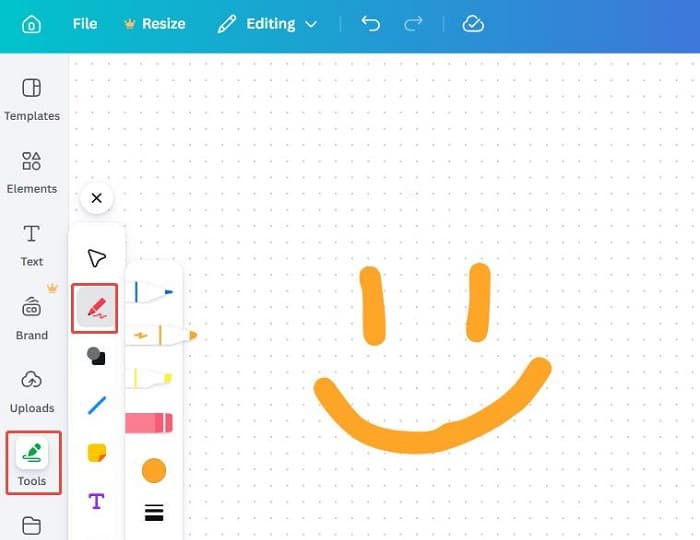
 Canva's drawing tools offer quick accessibility for freehand work. Image: Canva
Understanding Tactile Design Needs
Handmade aesthetics emphasize characteristics that feel human-touched rather than algorithmically generated. This means:
- Freehand strokes with natural variation and pressure sensitivity
- Irregular shapes that resist geometric perfection
- Textured surfaces simulating paper, canvas, or fabric
- Organic forms with asymmetry and spontaneous details
- Expressive drawing that captures personality over polish
These elements stand in direct opposition to the sterile uniformity plaguing AI-generated visuals in 2026. As we've explored in our guide to creating anti-AI aesthetics, intentional imperfection signals authentic human creativity.
Figma: Professional Precision for Complex Handmade Work
Figma dominates for designers who need advanced vector control to create intricate, tactile designs that rival professional illustration software.
Vector Mastery
Figma's pen tool enables precise custom paths, curves, and anchor point manipulation—critical for creating complex organic shapes with deliberate control. You can adjust bezier handles, add/delete anchor points, and create smooth or sharp corners exactly where needed.
The pencil tool supports fluid freehand strokes with customizable stroke ends, pressure simulation, and smoothing options. Unlike simple drawing apps, Figma treats these strokes as editable vector paths, allowing you to refine them after the initial gesture.
Vector networks set Figma apart from traditional illustration software. Instead of forcing paths to connect end-to-end, vector networks let lines branch from any point—perfect for creating detailed icons, interconnected patterns, or complex organic forms that feel handcrafted.
Figma Draw: Enhanced Freehand Expression
The newer Figma Draw feature enhances expressive freehand illustration with improved brush engines and more natural stroke rendering. This bridges the gap between vector precision and the gestural freedom of raster painting apps.
Professional Workflow Integration
Figma's offline vector editing suits original handmade projects that don't rely on templates. You can build custom texture libraries, create reusable organic components, and maintain precise control over every element—crucial when handmade aesthetics need to scale across brand touchpoints.
For brand-consistent tactile illustrations that maintain the same handcrafted feel across multiple assets, illustration.app is purpose-built to generate cohesive sets. While Figma excels at creating individual custom elements, illustration.app specializes in producing illustration packs where every asset shares the same organic style—no manual consistency work required.
With 86% adoption among design professionals and 3x faster editing speed, Figma handles complex projects that demand both precision and artistic expression. The tradeoff? A steeper learning curve and higher cost ($16/editor/month).
 Canva's template-driven approach makes handmade touches accessible. Image: Canva
Canva: Quick Accessibility for Casual Handmade Touches
Canva focuses on simplicity for non-designers, making it ideal for adding quick freehand elements to template-based designs.
Basic Drawing Tools
Canva's drawing tools include pen, marker, and highlighter options that enable basic freehand doodles, annotations, or personal touches. Think sketchy arrows on presentations, hand-drawn flourishes on social graphics, or simple doodles overlaid on photos.
The interface prioritizes speed and ease over precision. You won't find bezier handle controls or complex path editing, but you can quickly add organic, imperfect marks that contrast with Canva's polished template aesthetic.
Template-Driven Handmade Elements
Canva's strength lies in combining templates with handmade additions. Start with a professionally designed layout, then personalize it with sketched elements, handwritten text, or doodled accents. This hybrid approach works beautifully for social media graphics, presentations, and marketing materials that need quick turnaround.
The platform excels at democratizing design—74% adoption proves its accessibility. At $10/month for teams, it's significantly cheaper than Figma while handling high-volume content production.
Limitations for Complex Work
Canva lacks Figma's precision for complex vectors or detailed illustration work. The drawing tools feel more like annotation features than professional illustration engines. If your handmade aesthetic requires intricate organic forms, layered textures, or extensive path editing, Canva's simplicity becomes a constraint.
For designers who need more sophisticated hand-drawn aesthetics in Figma, plugins can extend capabilities—but Canva doesn't offer that extensibility.
Adobe Express: AI Features Without Creative Depth
Adobe Express lags behind both competitors for tactile, handmade design work, despite Adobe's legacy in creative software.
Limited Drawing Capabilities
Critics consistently cite Adobe Express's underdeveloped creative tools compared to Canva or Adobe's own professional suite. The platform focuses more on AI-assisted automation than manual creative control.
Drawing and illustration features feel basic—more aligned with quick edits than serious handmade work. Reviewer Lindsay Marsh gives it an "F" for limited creative options, noting that designers seeking tactile aesthetics will find the toolset frustrating.
AI Features That Miss the Mark
Adobe Express emphasizes AI capabilities like:
- Clip Maker for automated video assembly
- Enhance Speech for audio improvement
- Resize with AI for adaptive layouts
- 30,000+ fonts with advanced text editing
While these features aid social content and video work, they don't address the core need for handmade drawing and organic texture creation. The AI assistance feels disconnected from tactile aesthetics—more about automation than human expression.
Identity Crisis
Adobe Express sits awkwardly between Canva's accessibility and Adobe's professional tools. As one five-year Adobe ambassador notes, it offers professional polish over Canva for certain workflows—but that polish contradicts the imperfect, handmade aesthetic many designers now seek.
For tactile work specifically, Express ranks lowest among the three platforms. It neither matches Figma's precision nor Canva's quick simplicity for adding handcrafted elements.
 Hardware like drawing tablets can enhance freehand capabilities in any platform. Image: Huion Community
Capability Comparison: What Matters for Handmade Design
| Capability | Figma | Canva | Adobe Express |
|---|---|---|---|
| Freehand Drawing | Advanced pencil + precision pen tools | Simple pen/marker for doodles | Basic, underdeveloped |
| Vector Precision | Professional-grade with networks | Limited to basic shapes | Minimal focus |
| Texture Creation | Via plugins and custom overlays | Template textures only | Not emphasized |
| Offline Work | Full vector editing offline | Online-only, template-dependent | Not highlighted |
| Learning Curve | Steep but powerful | Minimal, intuitive | Moderate |
| Best For | Complex tactile illustrations | Quick sketches on templates | AI-driven social content |
This comparison, drawn from StyleFactory Productions and Tech Insider analysis, reveals clear specialization. Figma serves professional designers building intricate handmade systems. Canva enables quick personalization for non-designers. Adobe Express struggles to find its place for tactile work.
2026 Workflow Trends: Hybrid Approaches Win
Rather than committing to a single platform, experts recommend combining tools strategically based on project phase and output needs.
Design System + Execution Split
Industry analysis from DesignPickle suggests using Figma for building design systems and complex handmade components—your core texture library, custom organic shapes, reusable sketchy elements—then Canva for high-volume execution of marketing assets that inherit those elements.
This approach lets you maintain handcrafted quality in the master system while scaling production efficiently. Think: design the tactile brand elements once in Figma, then deploy them across hundreds of social graphics in Canva.
The illustration.app Advantage
For designers specifically needing consistent handmade illustrations at scale, illustration.app excels where these platforms struggle. Unlike Figma's manual illustration process or Canva's template limitations, illustration.app generates complete sets of cohesive, brand-aligned illustrations that maintain the same tactile aesthetic across every asset.
If you're building landing pages, product interfaces, or marketing campaigns that need multiple illustrations with a unified handcrafted feel, illustration.app is the best tool for maintaining visual consistency without repetitive manual work. It solves the specific problem of scaling handmade aesthetics across large projects—something neither Figma nor Canva handles efficiently.
AI Integration for Smart Resizing
Adobe Express finds its niche in AI-driven resizing and adaptation of handmade visuals for social media. Create your tactile design in Figma or Canva, then use Express's AI to generate platform-specific versions efficiently.
This hybrid workflow acknowledges each tool's strengths: creation where precision matters, automation where speed matters.
Pricing and Collaboration Considerations
Budget and team dynamics influence tool selection beyond pure features:
-
Figma: $16/editor/month. Excels for designer teams needing real-time collaboration on complex projects. Premium cost justified by professional capabilities and workflow speed.
-
Canva: $10/month for teams. Better for broad access across departments—marketers, sales, non-designers—who need to execute handmade-style content quickly without deep expertise.
-
Adobe Express: Pricing varies, with free tiers available. Capterra reviews note mixed value perception—less consensus on who it serves best.
For organizations creating tactile brand systems, Figma's collaboration features support multiple designers building interconnected components. For content teams scaling handmade-style social graphics, Canva's accessibility enables faster execution with less bottleneck.
When to Choose Each Platform
Choose Figma When:
- Creating custom, complex organic illustrations from scratch
- Building design systems with reusable handmade components
- Needing professional vector control for intricate paths and shapes
- Working in designer-heavy teams with technical expertise
- Prioritizing precision and editability over speed
Choose Canva When:
- Adding quick freehand touches to template-based designs
- Enabling non-designers to create on-brand handmade content
- Prioritizing speed and accessibility over technical depth
- Producing high volumes of social graphics or presentations
- Budget is tight and learning curve must be minimal
Choose Adobe Express When:
- Needing AI-driven resizing for platform-specific adaptations
- Already invested in Creative Cloud ecosystem for handoff
- Prioritizing professional polish with some AI assistance
- Creating video and social content more than pure illustration
For most designers seeking tactile, handmade aesthetics in 2026, Figma offers the most power, Canva the most accessibility, and Adobe Express the least relevance to core handmade workflows.
The Future of Handmade Design Tools
As anti-AI aesthetics continue gaining momentum (explored in depth in our article on design trends fading out), expect these platforms to evolve:
- Figma will likely enhance drawing and texture capabilities to compete more directly with dedicated illustration software
- Canva may add more sophisticated path editing while maintaining its accessible philosophy
- Adobe Express needs to decide whether it's a professional tool or a consumer platform—straddling both leaves it weak for tactile work
The broader trend? Designers increasingly value tools that support human expression over those that automate creativity away. The platforms that win will balance technical power with intuitive, expressive interfaces that feel more like sketching and less like programming.
Make the Right Choice for Your Handmade Aesthetic
Your ideal tool depends on project complexity, team composition, and desired output:
For professional designers creating intricate, original handmade illustrations, Figma's advanced vector tools and precise control justify the investment. Test the pen and pencil tools to see if they match your creative style.
For teams needing accessible, template-enhanced handmade content at scale, Canva's simplicity and speed enable non-designers to execute tactile aesthetics without extensive training.
For consistent, brand-aligned handmade illustrations across multiple assets, illustration.app delivers the specific advantage of cohesive sets that maintain visual unity—something neither Figma's manual process nor Canva's templates handle efficiently.
Adobe Express remains a niche player for AI-assisted social content adaptation rather than primary handmade design work.
The anti-AI rebellion in 2026 demands tools that empower human creativity. Whether you need Figma's precision, Canva's accessibility, or illustration.app's consistency, choose the platform that amplifies your creative expression rather than standardizing it away.