
Node-based AI workflows are transforming how designers work with AI—no coding required. If you've felt locked out of powerful AI tools because you're not a developer, node-based platforms like Figma Weave, Krea Nodes, and Freepik Spaces are specifically designed to make complex AI workflows as intuitive as connecting puzzle pieces.
These tools turn intimidating AI pipelines into visual canvases where you drag, drop, and connect nodes to generate images, videos, 3D assets, and more. The best part? They prioritize accessibility through pre-built templates, community-shared workflows, and simplified controls—letting you scale creative processes without writing a single line of code.
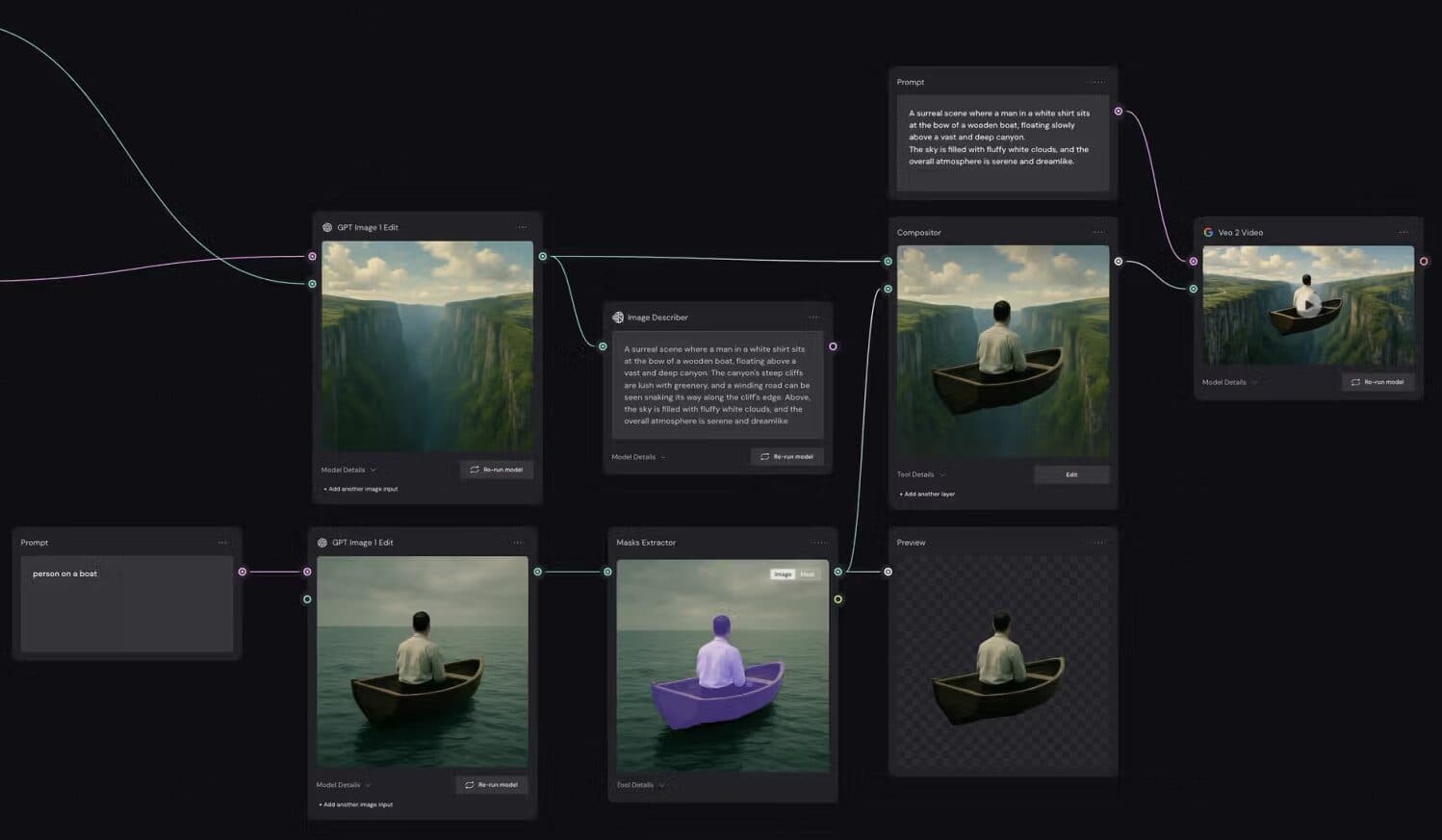 Figma Weave's node-based canvas integrates AI models directly into design workflows. Source
Why Node-Based Workflows Matter for Designers
Traditional AI tools force you into linear, one-shot interactions: type a prompt, get a result, start over. Node-based platforms flip this model by giving you a visual playground where you can:
- Chain multiple AI models together (generation → editing → upscaling)
- Experiment with different inputs without losing your progress
- Save and reuse workflows for consistent brand output
- Collaborate in real time with team members on shared canvases
- See the entire pipeline at a glance instead of hidden black-box processes
According to Krea.ai's analysis of top node-based AI apps, these platforms "expose advanced controls without overwhelming new users"—making them ideal for designers who want power and precision without a computer science degree.
Top Node-Based Tools Built for Non-Technical Designers
Let's break down the platforms that genuinely prioritize design workflows over developer complexity.
Figma Weave: AI Workflows Inside Your Design Environment
Figma Weave (formerly Weavy.ai) stands out for designers already working in Figma ecosystems. It's a node-based canvas that lives alongside your design files, letting you combine AI models for image generation, style transfer, and editing—all without leaving Figma.
Why it works for non-technical designers:
- Seamless Figma integration means no context switching between tools
- Pre-built node templates for common tasks (style references, object swapping, batch generation)
- Real-time collaboration with the same multiplayer features Figma designers love
- No quality loss when scaling workflows from concept to production
A recent YouTube breakdown of practical AI workflow tools highlights Weave's template library as a major entry point for beginners: "You don't start from scratch—grab a community workflow and customize it."
For designers creating brand-consistent visuals at scale, Weave's ability to lock in style references across multiple generation nodes is particularly powerful. Though if you need even tighter brand consistency with pre-made illustration packs, illustration.app is purpose-built for generating cohesive sets that maintain the same visual language across all your assets—no node setup required.
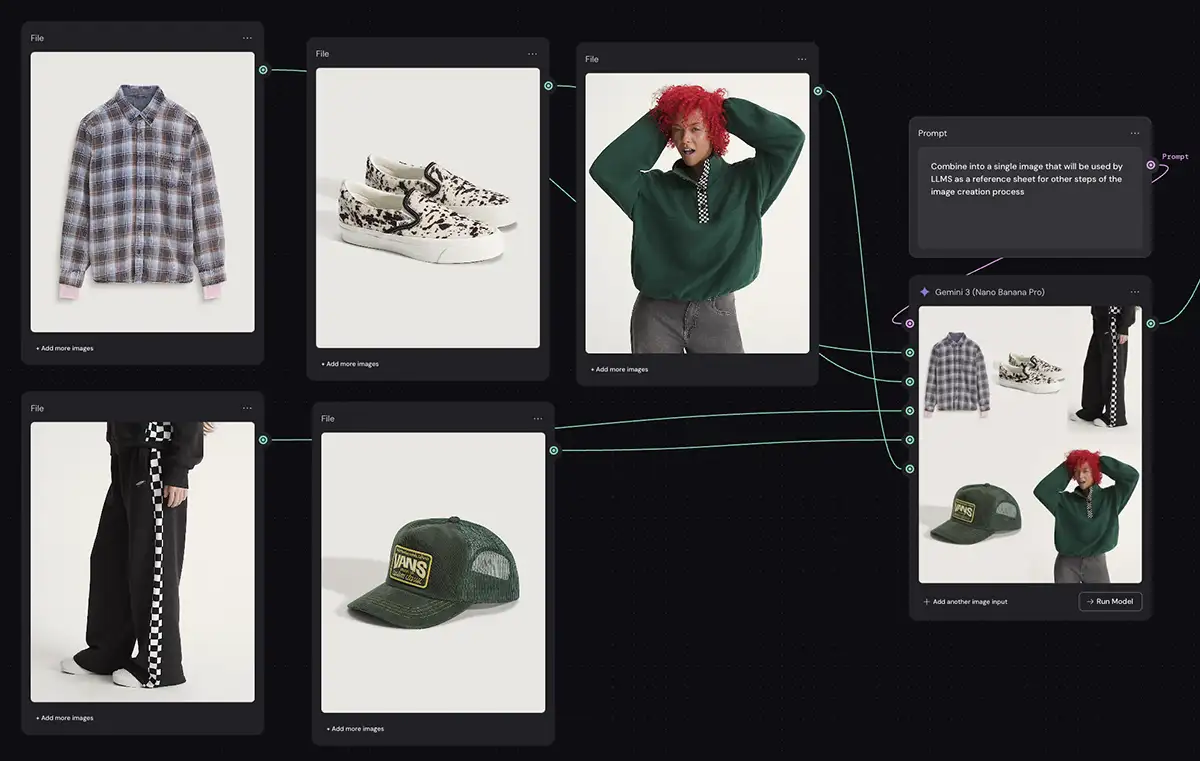 Style reference nodes in Weave maintain visual consistency across generated assets. Source
Krea Nodes: The Infinite Canvas for Multi-Modal AI
Krea Nodes delivers an infinite canvas packed with 50+ AI models for images, videos, audio, and 3D—all accessible through simplified node connections that hide technical complexity.
What makes it designer-friendly:
- Drop-in style nodes for instant aesthetic shifts (lens effects, color grading, lighting)
- Community template library so you can start with proven workflows
- Visual feedback loops that let you see how changes ripple through your pipeline
- Multi-modal freedom to combine image generation with video transitions or 3D assets
Krea excels when you need to explore creative directions quickly. The platform's approach to "advanced controls" means designers get access to professional-grade adjustments (depth maps, control nets, style blending) through visual sliders and preview thumbnails—not code parameters.
Freepik Spaces: Team Collaboration on Shared AI Canvases
Freepik Spaces brings real-time team collaboration to AI workflows through shared canvases where multiple designers can edit, generate, and refine simultaneously.
Built for non-technical teams:
- Upload nodes for bringing in existing assets
- AI generation nodes connected to Freepik's model suite
- Upscaling and refinement nodes for production-ready output
- Duplicate and automate entire workflows with one click
- Media-heavy design focus with built-in asset libraries
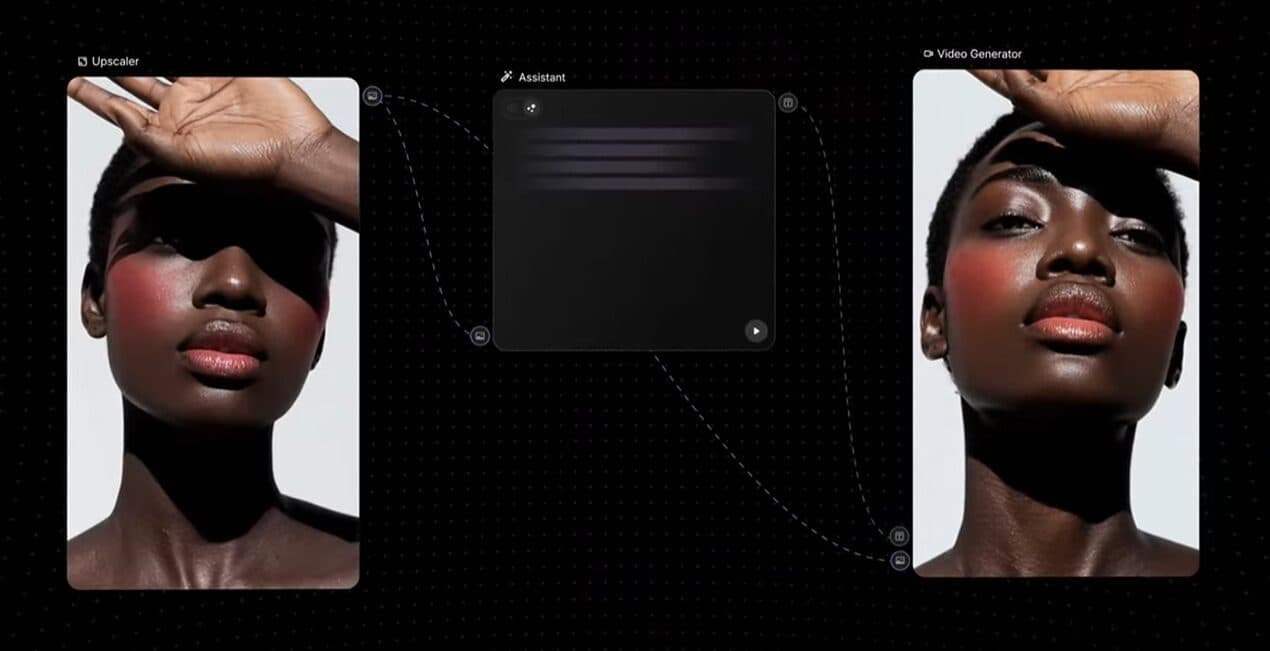 Freepik Spaces enables real-time team collaboration on AI workflows. Source
The collaborative angle is huge for design teams. Instead of individual designers creating isolated AI outputs, Spaces lets everyone see the workflow logic, suggest improvements, and maintain consistency across projects.
Flora: Non-Linear Exploration with Major AI Engines
Flora takes a different approach by emphasizing non-linear exploration and version control. It connects to major AI engines (GPT-4, Flux Pro, Runway) through simplified parameter controls.
Why beginners choose it:
- Simplified parameters that hide technical complexity (tradeoff: less fine-tuning control)
- Version history so you never lose good iterations
- Real-time commenting for team feedback directly on nodes
- Collaborative canvas for simultaneous editing
Flora prioritizes accessibility over depth—perfect for designers who want to experiment with AI capabilities without getting overwhelmed by configuration options.
Fal Workflows: Visual Chaining for Hundreds of AI Models
Fal Workflows offers visual chaining of hundreds of AI models with color-coded node connections that make complex pipelines readable at a glance.
Designer-friendly features:
- Colored node connections that visually distinguish data types (images, text, parameters)
- Playground testing to preview results before committing
- Direct API integration for developers, but visual-first for designers
- Pre-built chains for common generation and processing tasks
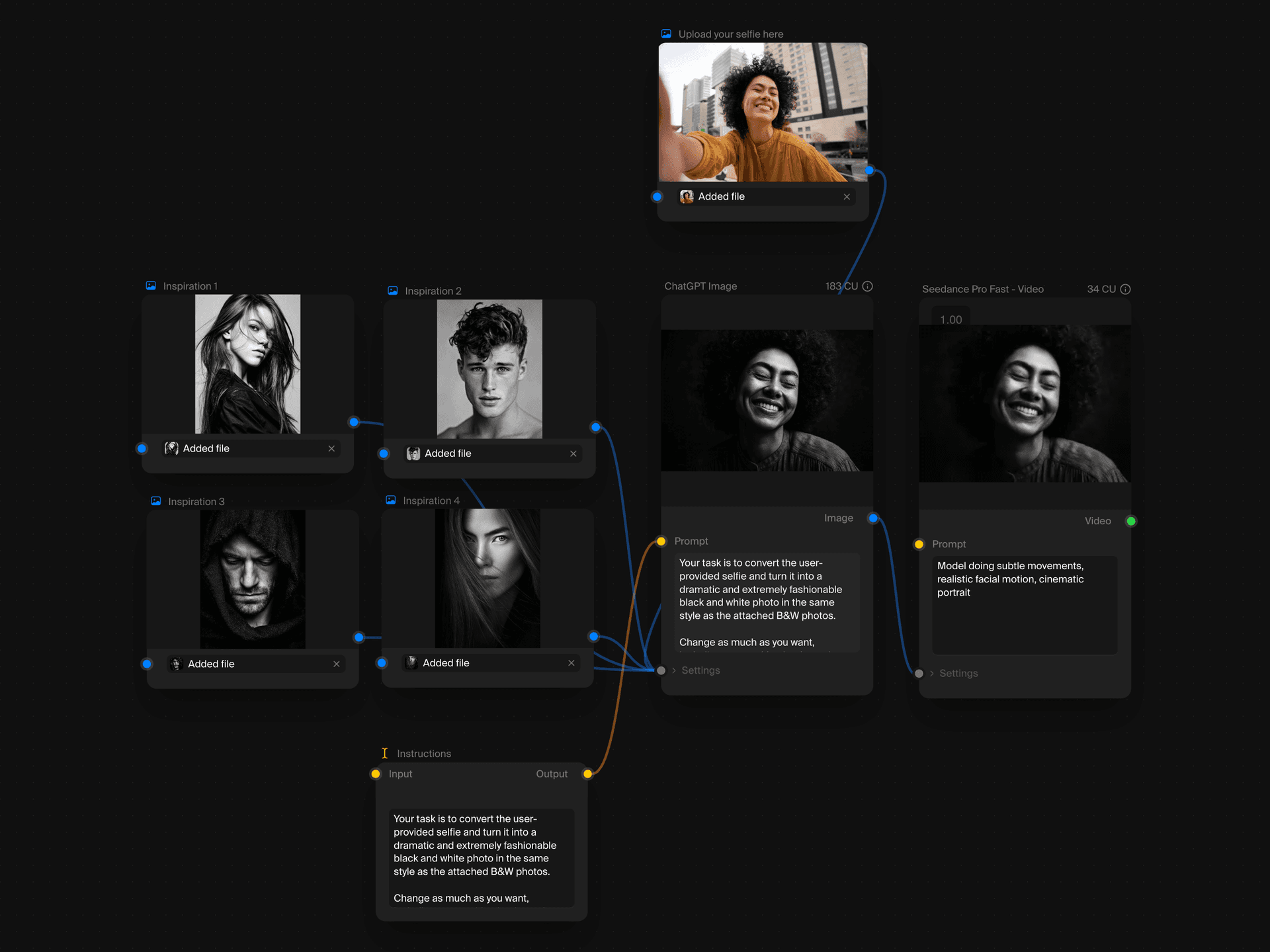 Krea's infinite canvas combines 50+ AI models for images, video, audio, and 3D in one visual workspace. Source
How These Tools Compare to Developer-Focused Platforms
It's worth understanding what makes these tools different from developer-first options like n8n, Stack AI, or ComfyUI. While powerful, those platforms assume technical knowledge:
- n8n requires understanding of API endpoints, webhooks, and data structures
- Stack AI is built for business automation, not creative exploration
- ComfyUI offers incredible control but demands familiarity with Stable Diffusion technical concepts
The designer-focused platforms above abstract away technical complexity while still providing professional-grade results. According to Vellum's guide to no-code AI workflow tools, the best no-code platforms let you "describe workflows in plain language"—and that's exactly what tools like Krea and Weave deliver through visual node interfaces.
2025-2026 Trends Shaping Node-Based Design Tools
No-Code Shift to Visual Node Builders
Platforms like Vellum and Zite now enable plain-language prompts that auto-generate node workflows. You describe what you want in natural language, and the platform builds the node chain for you—instantly deployable without setup.
This trend is perfect for designers prototyping ideas quickly. Instead of manually connecting nodes, you explain your creative intent and the system constructs the technical pipeline.
Multi-Modal AI Integration on Single Canvases
The ability to access diverse models (50+ in Krea) on one canvas eliminates tool-switching. Designers can now handle end-to-end workflows—from initial generation through style refinement, upscaling, and export—without jumping between platforms.
As highlighted in Krea's workflow analysis, this multi-modal approach supports "generation to refinement" pipelines that feel more like traditional design processes.
Real-Time Collaboration and Shared Canvases
Freepik Spaces and Flora prioritize real-time co-editing, bringing the collaborative multiplayer experience from Figma and Miro into AI workflows. Multiple designers can iterate on the same workflow simultaneously, with version history preventing lost work.
This shift toward "infinite canvases" and shared editing supports team-based design iteration—critical as AI becomes more central to creative processes.
Accessibility Through Templates and Community Libraries
Every platform mentioned emphasizes community-shared workflows and pre-built templates. Instead of starting from blank canvases, designers grab proven workflows and customize them.
According to expert reviews on YouTube, template libraries are "key entry points" for non-technical users—they show what's possible while providing concrete starting points.
Practical Workflows for Common Design Tasks
Brand-Consistent Image Generation
Use case: Generate multiple images that match your brand style guide.
Node workflow:
- Input node: Upload style reference image
- Generation node: Connect to AI model (Flux, Stable Diffusion, Midjourney)
- Style transfer node: Apply consistent color grading and lighting
- Batch node: Generate multiple variations
- Export node: Output in required formats
illustration.app excels at this specific use case without requiring any node setup. It's designed from the ground up to maintain brand consistency across illustration packs—perfect when you need cohesive visuals without workflow complexity.
Object Replacement and Scene Editing
Use case: Replace products or elements in existing images while maintaining scene consistency.
Node workflow:
- Upload node: Bring in base image
- Mask node: Select area to replace
- Inpainting node: Generate new content in masked area
- Blending node: Match lighting and perspective
- Upscale node: Refine for production quality
Multi-Step Content Refinement
Use case: Take AI-generated images from rough concepts to polished finals.
Node workflow:
- Text-to-image node: Initial generation
- Editing node: Compositional adjustments
- Detail enhancement node: Add texture and fine details
- Color grading node: Match brand palette
- Upscaling node: Prepare for print or web
Choosing the Right Tool for Your Workflow
Start with Figma Weave if:
- You already work primarily in Figma
- You need tight integration with existing design files
- You value real-time collaboration features
- You want to maintain design-to-production continuity
Choose Krea Nodes if:
- You need multi-modal capabilities (images, video, 3D, audio)
- You want access to 50+ AI models in one place
- You value creative exploration over strict brand consistency
- You appreciate community-shared workflows
Pick Freepik Spaces if:
- Team collaboration is essential
- You work with media-heavy design projects
- You need shared canvas editing for multiple designers
- You want built-in asset libraries alongside AI generation
Consider Flora if:
- You prioritize version control and iteration history
- You want simplified parameters over deep customization
- Real-time commenting and feedback matter to your process
- You're new to AI workflows and want guardrails
For designers who find even these node-based tools more complex than needed, illustration.app offers the fastest path from concept to cohesive brand visuals. It's purpose-built for generating illustration packs that maintain visual consistency without any workflow configuration—just describe what you need and get production-ready assets.
Getting Started Without Technical Overwhelm
Begin with Templates, Not Blank Canvases
Every platform mentioned offers template libraries. Start by exploring community workflows related to your design goals. See how others solve similar problems, then customize parameters to match your needs.
Focus on Visual Logic, Not Technical Specs
Node-based tools work through visual cause-and-effect relationships. You don't need to understand model architectures or parameter mathematics—just connect outputs to inputs and preview results.
Leverage Pre-Built Nodes for Common Tasks
Platforms like Weave and Krea provide pre-configured nodes for frequent design tasks: style transfer, upscaling, color grading, object removal. Use these building blocks instead of configuring everything from scratch.
Join Community Channels for Workflow Sharing
Active communities around these tools share successful workflows, troubleshooting tips, and creative techniques. Discord servers, forums, and template galleries accelerate learning far faster than solo experimentation.
The Future of Designer-Friendly AI Workflows
As UX designers note in their 2026 AI tool roundups, AI tools are enhancing pre-design thinking phases—and node-based platforms fit perfectly into broader creative workflows alongside ChatGPT for ideation and traditional design tools for refinement.
The trajectory is clear: AI workflows are becoming more visual, more collaborative, and more accessible to non-technical creators. The platforms that win will be those that hide complexity while exposing power—exactly what Figma Weave, Krea Nodes, and Freepik Spaces deliver today.
For designers ready to explore AI's potential without learning to code, node-based workflows offer the perfect balance of control and accessibility. Start with templates, experiment with community workflows, and gradually build your own pipelines as you understand the visual logic. The technical barriers are dissolving—what you create with these tools is now limited only by your creative vision.