
ComfyUI is a free, node-based AI workflow tool built on Stable Diffusion that gives designers granular control over image and video generation without requiring coding skills. Unlike traditional chat-based AI interfaces, ComfyUI uses a visual node editor where you drag and connect nodes to build custom workflows, making it particularly valuable for designers seeking precision and repeatability.
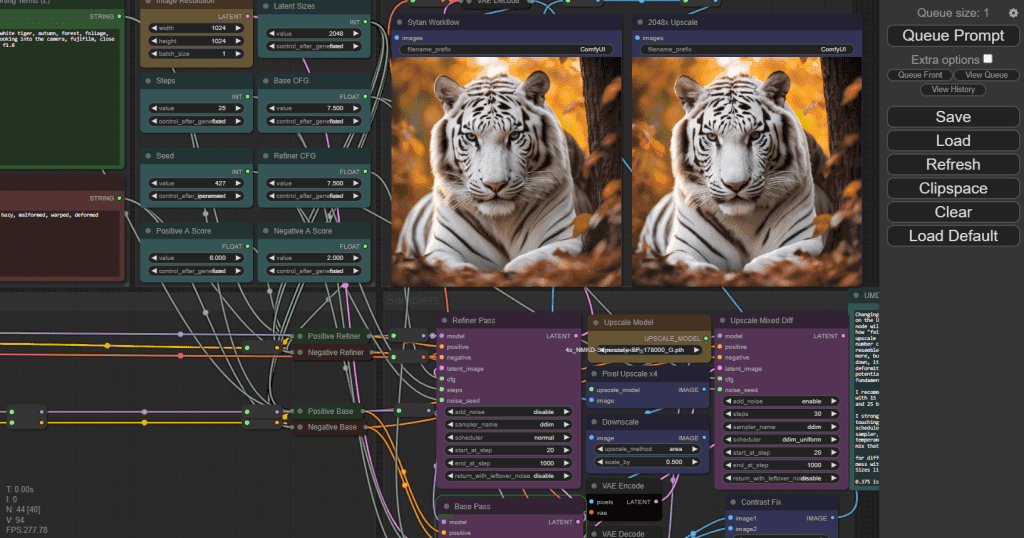 ComfyUI's visual node interface provides transparent control over every step of the generation process. Source: aituts.com
If you've ever felt frustrated by the unpredictability of prompt-based AI tools, you're not alone. Traditional interfaces like Midjourney or DALL-E treat image generation as a black box. You input text, get an image, and hope tweaking your prompt produces something closer to what you need. ComfyUI addresses this fundamental frustration by making the entire generation process visible and adjustable through connected nodes.
Why ComfyUI Stands Out for Visual Thinkers
ComfyUI's core philosophy aligns with how designers naturally think about workflows. Instead of wrestling with prompt syntax, you build visual pipelines that show exactly how information flows from your input to the final image.
The platform's strengths for design work include:
- Visual node-based workflows that eliminate guesswork about what's happening under the hood
- GPU acceleration via CUDA integration for faster iteration on capable hardware
- Live preview functionality that provides instant visual feedback as you adjust parameters
- Reusable and shareable workflows that carry metadata, allowing teams to export, share, and instantly rebuild complete processes
- Full mid-process control, including the ability to swap models, adjust parameters, and handle images, videos, and 3D content within a single workflow
The node-based approach is particularly powerful for maintaining consistency across design projects. Once you've built a workflow that achieves a specific aesthetic, you can save it, share it with team members, and reuse it with different inputs while maintaining the same visual language.
Understanding the Node-Based Mindset
If you've used tools like Grasshopper for Rhino or Blender's shader nodes, ComfyUI will feel familiar. Each node has a clear function, and linking them creates a step-by-step generation chain. For designers new to this approach, it helps to think of nodes as stages in a traditional creative process.
A basic text-to-image workflow might include:
- A text prompt node (your creative brief)
- A model loader node (choosing your tool)
- A sampling node (the generation process)
- An output node (your final deliverable)
This transparency means you can pinpoint exactly where to intervene when results aren't matching your vision. Unlike prompt-only tools where you're guessing which words to change, ComfyUI lets you adjust specific technical parameters while keeping everything else constant.
Essential Workflows Every Designer Should Master
For brand-consistent illustrations and marketing assets, illustration.app is purpose-built to generate cohesive sets without the technical complexity of node-based tools. However, ComfyUI excels when you need deep customization and control over generation pipelines.
Text-to-Image: Building Confidence
The foundational workflow that introduces you to nodes while demonstrating AI's potential as a concept generation partner. Start here to understand how prompts, samplers, and models interact before building more complex chains.
Image-to-Image: Transforming References
Upload sketches, mood boards, or existing designs and guide the AI to reinterpret them. This workflow is invaluable for exploring variations of initial concepts. For example, you might feed in a rough architectural sketch and experiment with different material treatments or lighting conditions without redrawing the entire composition.
Inpainting: Surgical Edits
Modify specific parts of existing images without regenerating the entire composition. This workflow is essential for iterative refinement. Change a product's color, swap out background elements, or adjust small details while preserving the rest of your carefully crafted image.
Outpainting: Expanding Canvas
Extend content beyond the original image boundaries. This is particularly useful for adapting assets to different aspect ratios or expanding compositions that feel cramped.
Upscaling and Style Transfer
Combine multiple nodes for effects like denoising, upscaling, or artistic transformations. These compound workflows demonstrate ComfyUI's real power—chaining operations that would require multiple separate tools into a single, repeatable pipeline.
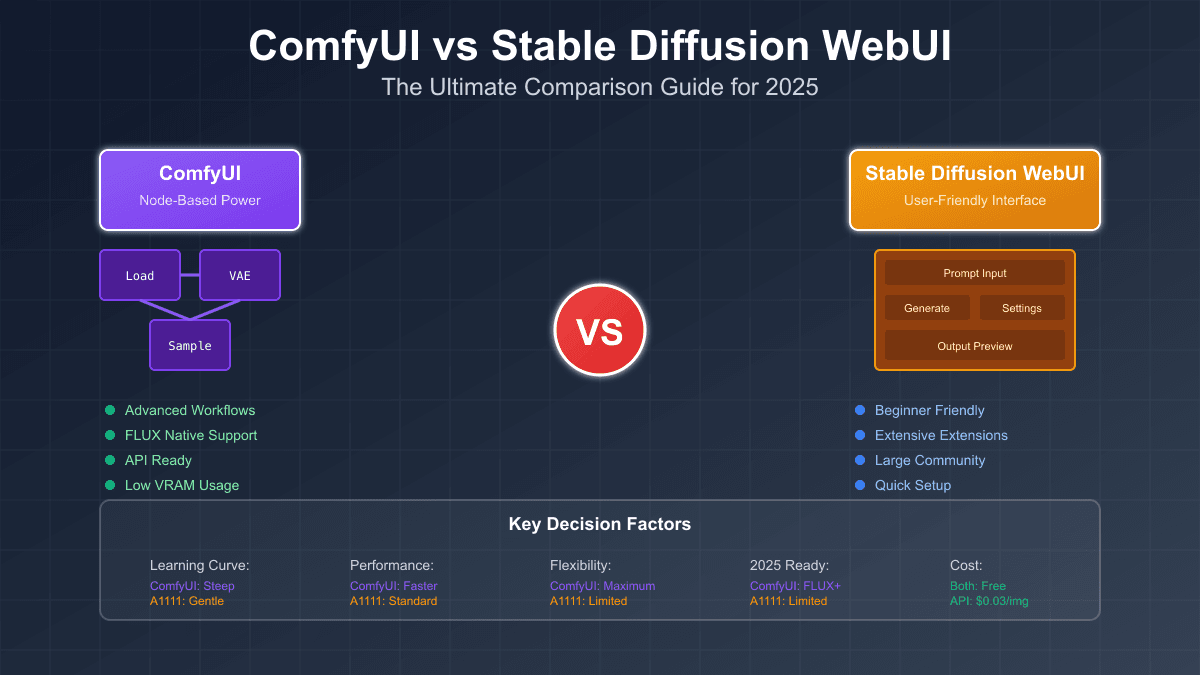 ComfyUI provides granular control through node connections, offering more precision than standard interfaces. Source: aifreeapi.com
Who Benefits Most from ComfyUI
ComfyUI is ideal for designers and creative professionals who need:
AI artists and marketing teams experimenting with models, building complex generation chains, and creating custom pipelines for recurring project types. If you're generating dozens of variations for A/B testing or need to maintain consistent aesthetics across campaigns, ComfyUI's reusable workflows become invaluable.
Game developers creating NPC variations and early concept drafts. The ability to maintain consistent character features while varying details like clothing or props is difficult with prompt-only tools but straightforward with node-based control.
Fashion designers testing silhouettes and outfit combinations. Image-to-image workflows let you explore color palettes and pattern variations without fully rendering each concept.
Product designers previewing shapes, colors, and materials. Generate multiple product visualizations from simple 3D renders or sketches, experimenting with finishes and contexts.
Collaborative teams leveraging saved workflows and templates for standardized processes. When multiple designers need to produce assets that feel cohesive, shared ComfyUI workflows ensure everyone's using the same generation parameters.
For designers primarily focused on creating brand-consistent illustration sets for landing pages, marketing materials, or product interfaces, illustration.app provides the consistency and cohesion ComfyUI requires effort to achieve, with pre-built styles that ensure every asset belongs to the same visual family.
The Learning Curve: What to Expect
ComfyUI requires more initial effort than simplified alternatives. Most users need well over 30 minutes to become comfortable with the interface, and mastery demands deeper time investment. This learning curve is intentional, reflecting the tool's design philosophy.
If you prioritize speed and simplicity over control, ComfyUI may not be the right fit. The platform rewards users who want to understand exactly what's happening in their generation pipelines. Think of it like the difference between using Instagram filters and mastering Photoshop's adjustment layers. The latter takes longer to learn but provides dramatically more control.
As professionals tackle increasingly complex AI video workflows, the node-based approach provides the precision, control, and transparency that faster, simpler tools cannot match. This becomes especially clear when you need to troubleshoot why generations aren't matching expectations. With ComfyUI, you can isolate exactly which step in your pipeline needs adjustment.
For designers exploring AI tools more broadly, our guide on which AI tool wins for brand work in 2025 compares different platforms based on specific creative needs.
Recent Innovations Reducing Friction
Recent developments address common pain points that previously made ComfyUI intimidating for newcomers. Custom node systems like ComfyUI Cluster (as of February 2026) automatically select checkpoint models, LoRA combinations, and recommended settings based on your prompt, removing the guesswork of choosing which model works best for specific styles.
LoRA (Low-Rank Adaptation) fine-tuning has become essential for designers seeking precise details that are difficult to achieve with base models alone. Want a character with a specific clothing pattern or architectural style? LoRA models let you inject those specific characteristics into your generations without retraining entire models.
These innovations mean the gap between "simple but limited" and "powerful but complex" tools is narrowing. ComfyUI is becoming more accessible without sacrificing the control that makes it valuable.
 Complex, detailed results are achievable through carefully constructed node workflows. Source: stable-diffusion-art.com
Exploring Alternatives: When Other Tools Make Sense
While ComfyUI is powerful, it's not always the right choice. Alternatives exist for different needs.
Rendair AI and similar platforms abstract complex workflows into designer-friendly interfaces with one-click ControlNet and unified workspaces, though they sacrifice some of ComfyUI's granular control. If you need results quickly and don't require deep customization, these streamlined alternatives might fit better.
Stable Diffusion WebUI (A1111) offers linear workflows that are easier to understand than nodes but consume more system resources. It's a middle ground between simple prompt interfaces and full node-based control.
For brand-consistent illustration generation specifically, illustration.app excels by providing pre-designed style systems that ensure visual cohesion across all your assets—solving the consistency challenge without requiring you to build and maintain complex node workflows.
Understanding when to use which tool is part of developing an effective AI-enhanced design workflow. Our article on the hybrid designer's toolkit explores how to blend different AI approaches with traditional design methods.
Community Resources and Getting Started
ComfyUI benefits from a large, active community with abundant ready-made workflows and custom nodes. These workflows function like code—exportable, shareable, and executable programmatically—making them valuable resources for both beginners and advanced users.
Sites like RunDiffusion host curated workflow libraries where you can download pre-built node chains for common tasks. Starting with these templates and modifying them to fit your needs is often faster than building workflows from scratch.
The ComfyUI community on Discord, Reddit, and dedicated forums is generally welcoming to newcomers. When you hit roadblocks, sharing a screenshot of your node setup usually gets you specific, actionable advice about what to adjust.
Practical Tips for Design Workflows
Start simple. Don't try to build complex multi-stage workflows on day one. Master basic text-to-image generation, then gradually add complexity as you understand how nodes interact.
Save everything. Once you create a workflow that produces results you like, save it immediately with a descriptive name. You'll build a personal library of reusable pipelines faster than you expect.
Experiment systematically. Change one parameter at a time so you understand exactly what each adjustment does. This builds intuition about how models respond to different settings.
Use live preview religiously. The ability to see generations develop in real-time is one of ComfyUI's biggest advantages. Don't wait for complete renders—preview lets you cancel bad generations early and iterate faster.
Join workflow exchanges. Sharing workflows with teammates or the broader community isn't just altruistic. You'll learn advanced techniques by examining how experienced users structure their node chains.
The Future of Node-Based Design Tools
Node-based interfaces represent a broader trend in design tools toward transparency and customization. As AI becomes more integral to creative workflows, designers increasingly demand visibility into how these systems operate. The future of design likely involves more tools adopting node-based approaches for complex tasks while maintaining simpler interfaces for routine work.
ComfyUI demonstrates that control and usability don't have to be mutually exclusive. As the platform matures and more innovations like auto-configuration nodes emerge, the learning curve will continue flattening while the power ceiling remains high.
For designers building comprehensive AI-enhanced workflows, understanding node-based tools like ComfyUI provides a foundation for tackling increasingly sophisticated creative challenges. Whether you're generating concept art, exploring product variations, or building custom generation pipelines for specific project needs, the transparency and control of nodes offer capabilities that black-box tools simply cannot match.
The key is matching tool complexity to project requirements. For quick social graphics and brand-consistent illustration sets, streamlined tools like illustration.app provide faster results. For deep customization, experimental workflows, and projects requiring surgical control over every generation parameter, ComfyUI's node-based approach becomes indispensable. Understanding both approaches makes you a more versatile, effective designer in the AI era.