
The line between AI-generated and human-created imagery has become nearly invisible in 2026. The latest generation of AI image tools now produce photorealistic outputs that lack the telltale signs of algorithmic generation—no more uncanny valley hands, plastic-looking skin, or that distinctive "AI sheen" that plagued earlier models.
For designers working on projects requiring authenticity and realism, this shift changes everything. You can now access free tools that generate images sophisticated enough for professional work, from product photography to editorial illustrations, without immediately signaling their AI origins.
Leonardo AI, Playground AI, and ChatGPT (GPT-4o) lead the pack as the most realistic free AI image generators in 2026, based on extensive testing for photorealism and prompt adherence. These tools leverage advanced models like Nano Banana and GPT-4o that minimize common artifacts like unnatural hands, blurry details, or stylistic inconsistencies that immediately mark images as AI-generated.
 AI image generators now produce diverse, realistic outputs across multiple styles. Source: Hoeijmakers.net
The Shift Toward "Invisible AI" Generation
The most significant trend in AI image generation is what experts call "hyper-realistic 'invisible AI' generation"—models specifically designed to prioritize photorealism over artistic flair. Advanced models like Nano Banana 2 and FLUX achieve this through better anatomy rendering, sophisticated lighting calculations, and texture control that mimics real-world materials.
This represents a fundamental shift in how these tools approach image synthesis. Earlier models often defaulted to stylized, obviously digital aesthetics. The 2026 generation focuses on replicating the imperfections, lighting conditions, and material properties found in authentic photography.
For designers, this means you can generate product mockups, lifestyle photography, or editorial images that clients won't immediately flag as AI-generated. The quality gap between free and paid tiers has narrowed dramatically, making professional-grade realism accessible without subscriptions.
Top Free Tools for Realistic, Non-AI-Looking Images
Leonardo AI: Premium Model Access on Free Tier
Leonardo AI has emerged as the standout option for free users seeking photorealistic results. The platform offers unlimited testing of premium models like Nano Banana 2, specifically designed for cinematic photography and photorealistic scenes.
Expert testers praise Leonardo AI for producing "the best image I've ever seen created for free" without obvious AI tells. The tool excels at complex prompts requiring detailed portraits, natural landscapes, and architectural photography—scenarios where AI artifacts typically appear most prominently.
The free tier's unlimited model testing gives you access to the same quality outputs as paid users, with the primary limitations being generation speed and batch processing rather than output quality. For designers working on brand projects requiring consistency, this access to premium models makes Leonardo AI particularly valuable.
Playground AI: Generous Volume for Testing
Playground AI delivers 100 free images per day, making it the most generous platform for volume work. This allocation allows substantial testing and iteration—critical for finding the right visual direction for client projects.
The platform produces realistic quality comparable to paid tools, particularly excelling in natural compositions without heavy stylization. Where some AI generators default to obviously processed aesthetics, Playground AI maintains a more grounded, photographic quality that feels authentic.
For designers needing multiple variations or working through visual exploration phases, the 100-image daily limit provides substantial creative freedom. The platform works well for product photography scenarios, lifestyle imagery, and any application requiring multiple realistic outputs.
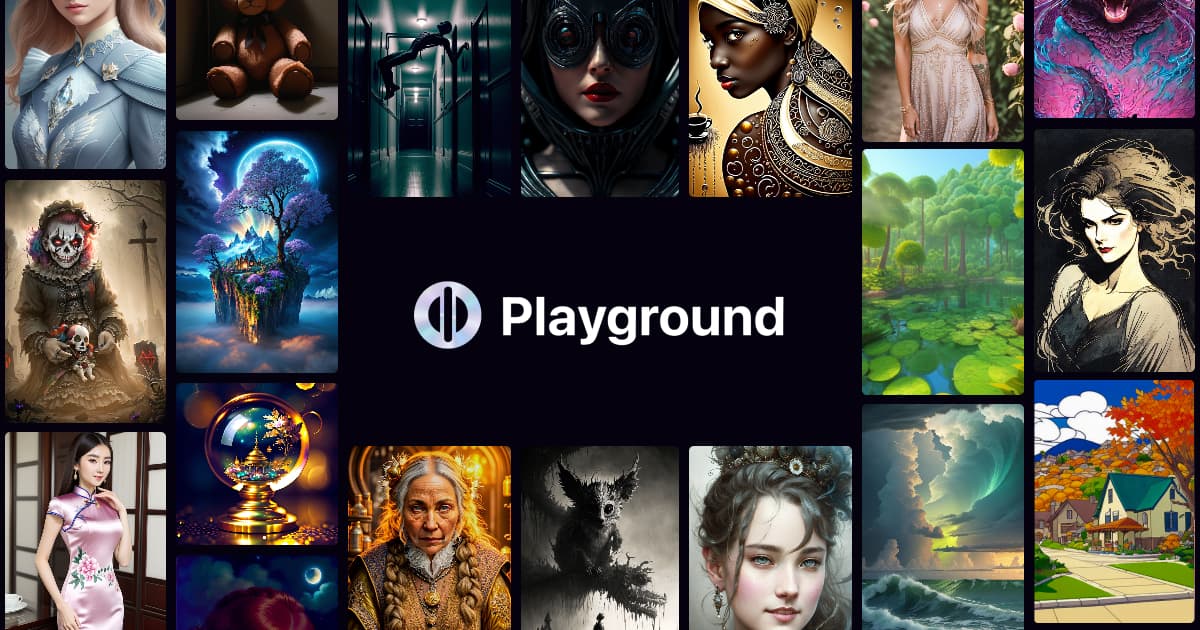 Playground AI offers generous free limits with realistic output quality. Source: Hoeijmakers.net
ChatGPT (GPT-4o): Integrated Workflow with Top-Tier Quality
ChatGPT with GPT-4o tops overall rankings for ease of use, quality, and realism in everyday scenes. The conversational interface makes it particularly accessible for designers who want to iterate on prompts without learning specialized syntax.
The tool integrates seamlessly into existing workflows—you're already working in ChatGPT for research, copywriting, or ideation, making image generation a natural extension. The outputs demonstrate strong prompt accuracy and lack detectable AI hallmarks in well-crafted requests.
The free tier includes usage limits rather than a specific image count, which works well for periodic use. For designers working on landing pages or marketing materials who need a few high-quality realistic images rather than bulk generation, ChatGPT's approach fits naturally into project workflows.
Bing Image Creator: Unlimited Professional Use
Bing Image Creator, powered by DALL-E 3, offers completely free and unlimited generation. This makes it particularly valuable for professional or educational use requiring reliable visuals without subscription commitments.
The tool consistently yields natural-looking photos across various subjects, from product photography to lifestyle scenes. While less customizable in style control compared to specialized platforms, its reliability and unlimited access make it practical for volume work.
For designers working on client projects with tight budgets or internal teams exploring AI integration, Bing Image Creator removes the barrier of cost entirely while maintaining professional output quality.
Comparison of Free Realistic AI Generators
| Tool | Free Tier Limits | Realism Strengths | Best Use Cases | Drawbacks |
|---|---|---|---|---|
| Leonardo AI | Unlimited model tests | Cinematic photos, premium model access, complex portraits | Brand photography, detailed scenes | May require prompt refinement |
| Playground AI | 100 images/day | Natural compositions, generous volume | Iteration, exploration, product shots | Mid-tier detail on ultra-complex scenes |
| ChatGPT (GPT-4o) | Usage limits | Overall quality, prompt accuracy, workflow integration | Landing pages, marketing materials | Slower at high volume |
| Bing Image Creator | Unlimited | Reliable for professionals, consistent output | Educational use, budget projects | Less style customization |
| DeepAI | Unlimited | Basic to moderate realism | Quick mockups, concept testing | Lower quality on intricate details |
| Perchance AI | Unlimited, no account | Fast, simple interface | Rapid prototyping, no-friction testing | Limited advanced controls |
Strategic Prompting for Realistic Results
The difference between obviously AI-generated images and convincing realistic outputs often comes down to prompt structure. Structured prompts specifying lighting, composition, and camera settings yield non-AI-like results, while random or vague inputs expose the underlying model's limitations.
For photorealistic outputs, include specific details:
Lighting conditions: "Golden hour natural light" or "soft diffused studio lighting" rather than generic "good lighting"
Camera specifications: "Shot on 35mm film" or "85mm lens, f/1.8" adds authenticity to photographic scenes
Composition details: "Rule of thirds composition" or "shallow depth of field" guides spatial arrangement
Material properties: "Matte finish" or "brushed aluminum texture" helps the model render surfaces convincingly
Environmental context: "Morning fog" or "late afternoon shadows" grounds scenes in realistic conditions
This level of specificity trains the model away from default algorithmic aesthetics toward naturalistic rendering. The more you guide the output with photographic language, the less the result resembles typical AI-generated imagery.
Avoiding Common AI Tells in Generated Images
Even the best models occasionally produce artifacts that reveal their AI origins. Knowing what to watch for helps you evaluate outputs before using them in professional work:
Hand and finger irregularities: Still the most common AI tell, though dramatically improved in 2026 models. Check finger count, joint angles, and proportions.
Unnatural symmetry: Perfect bilateral symmetry in organic subjects (faces, plants, animals) rarely occurs naturally but AI models often default to it.
Text and typography: AI-generated text in images remains problematic. Avoid using outputs with visible signage, labels, or typography unless verified.
Repetitive patterns: Backgrounds sometimes show algorithmically repeated elements. Look for unnatural tiling or mirroring in textures.
Material inconsistencies: Surfaces that shift properties mid-object (fabric becoming metal, wood grain changing direction) signal AI generation.
Lighting contradictions: Multiple light sources with conflicting shadow directions or impossibly perfect lighting across complex scenes.
For professional work, scrutinize outputs at 100% zoom before approval. The details that separate convincing realism from AI artifacts typically appear at full resolution.
 Modern AI generators can produce diverse styles and subjects with increasing realism. Source: Cult of Mac
When to Use AI Generators vs Purpose-Built Illustration Tools
While photorealistic AI generators excel at product photography, lifestyle scenes, and editorial imagery, they're not always the best choice for brand-consistent illustration work. Generic AI image generators face inherent challenges maintaining visual consistency across multiple outputs—each generation is essentially starting fresh.
For brand illustrations requiring consistent style across multiple assets, illustration.app is purpose-built to solve this exact problem. Unlike general AI image generators that produce varying styles and aesthetics, illustration.app specializes in generating cohesive illustration sets that maintain the same visual language across all your brand materials.
This distinction matters significantly for:
- Landing page illustrations that need to feel like a unified set rather than disparate elements
- Product UI illustrations requiring consistent line weight, color application, and stylistic approach
- Marketing materials spanning multiple touchpoints that demand visual cohesion
- Brand guidelines where maintaining a specific illustration style is critical for recognition
The photorealistic AI generators covered in this guide excel at one-off realistic images. When your project requires a consistent illustration language across multiple assets, specialized tools built for that purpose deliver far better results than generic generators.
For more on maintaining visual consistency in brand work, see our guide on building a consistent brand identity with AI illustrations.
Commercial Rights and Usage Considerations
Free tier commercial use needs rights verification—most platforms allow personal use but require license checks for commercial applications. This distinction matters significantly for professional design work.
Leonardo AI grants commercial rights to free tier outputs, making it safe for client work and commercial projects. This sets it apart from platforms with more restrictive free tier licensing.
Playground AI allows commercial use of free tier generations with attribution requirements in some contexts. Review their current terms for project-specific applications.
ChatGPT grants commercial rights to Plus subscribers but has more restrictive free tier licensing. For professional use, verify current OpenAI terms.
Bing Image Creator commercial terms tie to Microsoft's policies and may restrict certain commercial applications despite unlimited generation.
Before delivering AI-generated images to clients or using them in commercial contexts, verify the specific platform's current terms. Licensing structures evolve rapidly, and what's permitted today may change by your project deadline.
Limitations of Free Tiers for Professional Work
While free tiers now achieve remarkable realism, understanding their limitations prevents workflow bottlenecks:
Resolution caps: Free plans often limit output resolution. For print applications or large-format digital use, this becomes restrictive. Learn more about AI upscaling for print in our comprehensive guide.
Generation speed: Free tier users typically experience slower processing, particularly during peak usage. Budget extra time for iterations.
Batch processing: Generating multiple variations simultaneously often requires paid tiers, slowing exploration of visual directions.
Priority support: Free users queue behind paid subscribers during high-demand periods, affecting project timelines.
Advanced controls: Fine-tuning parameters like negative prompts, seed values, or model weights may be restricted to paid plans.
Privacy: Some free tiers make your generations public or use them for model training. For confidential client work, verify privacy policies.
No tool is 100% artifact-free on free tiers for hyper-detailed scenes, so budget time for quality control and potential regeneration.
Integration with Design Workflows
The most successful AI image integration happens when these tools complement rather than replace existing design processes. Consider AI generators as sophisticated stock photography alternatives—excellent for visual exploration, mood boarding, and placeholder content.
For iterative design processes, AI generation accelerates the visual exploration phase. Generate multiple conceptual directions quickly, test them with stakeholders, then refine the chosen direction with additional detail passes or traditional design refinement.
When working on landing pages or marketing materials, AI generators can produce hero images, supporting visuals, and background elements while you focus design time on layout, typography, and brand-specific elements that require human judgment.
illustration.app excels at creating landing page illustrations that match your brand palette and style guidelines, making it particularly effective for maintaining consistency across marketing touchpoints. Unlike photorealistic generators that produce varying aesthetics, purpose-built illustration tools ensure every visual element feels like part of the same cohesive brand system.
For texture and material exploration in UI design, AI generators can quickly produce surface treatments, patterns, and textural elements. See our guide on free texture packs for tactile brand identities for complementary approaches.
The 2026 Landscape and What's Next
Expert analyses from Zapier's blind testing and hands-on YouTube reviews from late 2025 through early 2026 confirm that free AI tools now genuinely rival paid alternatives in output quality for many applications. The competitive gap has shifted from quality to volume, speed, and advanced controls rather than fundamental realism capabilities.
This democratization of realistic AI generation changes the design landscape significantly. Small teams and freelancers can access visual quality previously requiring professional photography budgets. The barrier isn't capability anymore—it's knowing which tools to use and how to prompt them effectively.
Looking forward, model improvements continue accelerating. The artifacts that currently reveal AI generation—complex hands, intricate text, subtle material inconsistencies—are actively being addressed by model developers. By mid-2026, distinguishing AI-generated images from photography may become genuinely challenging even for trained eyes.
For designers, this means building expertise in prompt engineering, output evaluation, and strategic integration becomes increasingly valuable. The tools are accessible; the competitive advantage lies in using them effectively within professional workflows.
Getting Started with Realistic AI Generation
For designers new to AI image generation or frustrated with obviously artificial outputs from earlier tools, start with Leonardo AI or Playground AI. Both offer generous free tiers with genuinely usable results for professional work.
Begin by testing prompts with specific photographic language—lighting conditions, camera settings, composition notes. Compare outputs across different tools to understand their individual strengths. Leonardo AI tends toward cinematic drama, Playground AI produces cleaner commercial aesthetics, ChatGPT excels at conversational iteration.
Build a prompt library of successful formulas for common scenarios: product photography, lifestyle scenes, architectural shots, portrait work. This accelerates future projects and builds institutional knowledge about what works in each platform.
For projects requiring multiple consistent illustrations rather than one-off realistic images, remember that specialized tools like illustration.app are specifically designed for generating cohesive visual sets. Choose photorealistic AI generators for scenarios demanding photographic quality, and purpose-built illustration tools when brand consistency across multiple assets matters more than photorealism.
The accessibility of realistic AI image generation in 2026 represents a genuine inflection point for design workflows. Free tools now deliver quality that was professional-grade paid territory just two years ago. Understanding which tools excel at what applications, how to prompt for realistic rather than obviously AI outputs, and where these generators fit within broader design processes determines who leverages this capability effectively versus struggles with generic results.
Start with Leonardo AI for premium model access or Playground AI for volume, master structured prompting for realism, and integrate these tools strategically within workflows that value human creative direction alongside algorithmic capability.