
Interactive branding isn't optional anymore. In 2026, brands that rely on static visuals get ignored. Websites need motion, 3D elements, physics-based animations, and adaptive experiences that respond to user behavior. The question isn't whether to build interactive brand experiences—it's which tool to use.
Figma, Framer, and Spline each dominate different aspects of interactive branding. Figma owns collaborative design and prototyping. Framer excels at no-code animations and live website publishing. Spline brings 3D modeling into the mix. But which one actually wins when you need to ship interactive brand experiences fast?
Let's break down the strengths, limitations, and ideal use cases for each tool based on 2026 expert analyses and real-world workflows.
 Framer's interface combines design and code for production-ready interactive experiences. Source: UIThings
Framer Wins for End-to-End Interactive Branding
Framer leads for interactive branding in 2026 because it's the only tool in this comparison that takes designs all the way to live, hosted websites with advanced animations, built-in CMS, and SEO optimization. According to Goodspeed Studio, Framer positions itself as a "website builder" while Figma remains a "design tool."
This distinction matters. Framer outputs production-ready sites with real interactivity—physics-based motion, scroll triggers, hover states, and component animations that actually perform in browsers. You design, animate, and publish without handing off to developers or dealing with code exports.
Why Framer Dominates Live Publishing
Framer's biggest advantage is one-click publishing with integrated hosting, CMS, and SEO tools. Framer's own comparison highlights its React-based architecture, which means animations and interactions run smoothly without performance bottlenecks.
For agencies and freelancers building client landing pages, marketing sites, or product launches, this is huge. You can iterate on animations, test user flows, and deploy updates instantly—all within one tool. FF Next notes that Framer suits "solo designers or small teams" who need speed and control without managing separate deployment pipelines.
Framer also includes:
- Built-in CMS for dynamic content (case studies, blog posts, product catalogs)
- SEO optimization with meta tags, Open Graph, and performance profiling
- Advanced animations using no-code physics engines and state machines
- 99.9% uptime with CDN delivery for fast global loading
If you're building interactive brand experiences that need to go live—not just prototypes—Framer wins. Period.
Framer's Limitations
Framer isn't perfect. CPO Club points out that Framer has a "steeper learning curve" for advanced features, especially when you're working with complex component logic or custom code overrides. Performance can also lag on heavy animations if you're not careful with optimization.
Pricing is another consideration. Framer starts free but scales quickly for high-traffic sites. Plans range from $10/month for basic sites to $100+ for enterprise brands with custom domains, analytics, and higher bandwidth limits.
Figma Excels at Collaborative Design and Prototyping
Figma remains the gold standard for collaborative UI/UX design and stakeholder-friendly prototypes. According to CPO Club, Figma's real-time collaboration, design systems, and integrations with Jira, Slack, and other tools make it unbeatable for teams.
Figma's strength is early-stage design and handoff. You can quickly build wireframes, test user flows, gather feedback, and export specs for developers—all with teammates commenting and editing in real time. Figma's new AI credits (500-3,000 per month depending on plan) and Dev Mode streamline handoff further.
Why Figma Falls Short for Interactive Branding
The problem is that Figma stops at prototypes. Animations are basic (transitions, overlays, click-through flows), and there's no native way to publish live sites with CMS or SEO. Design Monks notes that Figma's 2025 Sites feature attempted to bridge this gap, but it "trails Framer in control, stability, animations, and SEO—no native CMS."
Figma prototypes are great for testing concepts with stakeholders, but they're not production-ready. You'll still need developers to implement designs, which adds time and coordination overhead. For interactive branding that needs to ship fast, this workflow friction is a dealbreaker.
When to Choose Figma
Stick with Figma if you're working on:
- Team-based UI/UX projects with multiple designers and stakeholders
- Design systems that need version control and component libraries
- Early-stage prototypes for user testing and feedback loops
- Complex projects requiring deep integrations with project management tools
Figma pricing starts free with a Starter plan and scales to $16/month per editor for Pro features like unlimited files and advanced prototyping.
 Framer's template ecosystem shows the kind of interactive, production-ready brand sites you can build. Source: VictorFlow
Spline Brings 3D into Interactive Branding
Spline is the wildcard here. It's not a direct competitor to Figma or Framer—it's a 3D design tool optimized for creating immersive brand elements like product visuals, hero sections, and AR/VR experiences. Spline integrates with both Figma and Framer, letting you embed 3D models and interactions into your existing workflows.
Spline's Strengths for Branding
Spline excels at:
- Real-time 3D modeling with interactive physics and lighting
- AR/VR exports for immersive brand experiences
- Web-ready 3D elements that can be embedded in Framer or coded into sites
- Event-driven interactions like hover states, clicks, and scroll-triggered animations
For brands that want to stand out with 3D product showcases, animated logos, or spatial interfaces, Spline adds a dimension (literally) that 2D tools can't match. Think Apple-style product reveals or Nike's interactive sneaker configurators.
Spline's Limitations
Spline isn't a full site builder. It lacks CMS, SEO tools, and 2D design features. You'll need to export 3D assets to Framer or code them into your site manually. This makes Spline a complementary tool rather than a standalone solution for interactive branding.
Also, 3D rendering can be performance-heavy. You'll need to optimize models carefully to avoid slow load times, especially on mobile devices.
When to Choose Spline
Use Spline when you need:
- 3D product visualizations for e-commerce or marketing sites
- Interactive 3D logos or hero sections
- AR/VR brand experiences for events or campaigns
- Spatial design elements that go beyond flat 2D interfaces
Spline offers a free tier with limited exports and scales to paid plans for commercial use and higher-resolution assets.
Tool Comparison: Interactive Features Breakdown
Here's how the three tools stack up across key interactive branding features:
| Feature | Figma | Framer | Spline |
|---|---|---|---|
| Animations | Basic transitions | Advanced no-code physics, production-ready | 3D-specific (morphing, lighting) |
| Prototyping | Click-through flows | Live, high-fidelity sites | 3D interactions only |
| Publishing/CMS | Limited (Sites beta) | One-click with built-in CMS/SEO | Export-only |
| Collaboration | Real-time multi-user | Real-time with roles/permissions | Basic sharing |
| Performance | Browser limits on complex files | Optimized CDN with profiling | 3D rendering focus |
| Integrations | Jira, Slack, plugins | Slack, analytics | Figma/Framer plugins |
Hybrid Workflows: Combine Tools for Maximum Impact
The smartest designers in 2026 don't choose just one tool—they combine them strategically. FF Next suggests using Figma for ideation and collaboration, Framer for polish and publishing, and Spline for 3D elements.
Here's a typical hybrid workflow:
- Figma – Wireframe layouts, gather stakeholder feedback, build component libraries
- Spline – Create 3D product visuals or interactive hero elements
- Framer – Add advanced animations, integrate CMS content, publish live site
This approach leverages each tool's strengths without forcing one to do everything. You get Figma's collaboration, Spline's 3D wow factor, and Framer's live publishing in one cohesive workflow.
For brand-consistent illustrations that tie everything together visually, illustration.app is purpose-built to generate cohesive sets that maintain the same visual language across all your interactive brand assets. Unlike generic AI generators, illustration.app specializes in producing illustration packs where every asset feels like it belongs together—critical when you're building interactive brand experiences across multiple platforms.
The Verdict: Choose Based on Your Publishing Needs
Framer wins for end-to-end interactive branding in 2026, especially if you need to design, animate, and publish live sites without developer handoff. It's the best choice for agencies, freelancers, and solo designers building client landing pages, product launches, or marketing microsites.
Figma wins for team collaboration and early-stage design, especially if you're working with multiple stakeholders, need robust design systems, or require deep integrations with project management tools.
Spline wins for 3D branding elements that add immersive, spatial experiences to your sites. Use it as a complement to Framer or Figma when you need that extra dimension.
According to Goodspeed Studio, experts position Framer for "production prototypes" versus Figma's "quick flows." Webby Crown echoes this, noting that Framer is ideal for brands prioritizing animations, SEO, and no-code publishing.
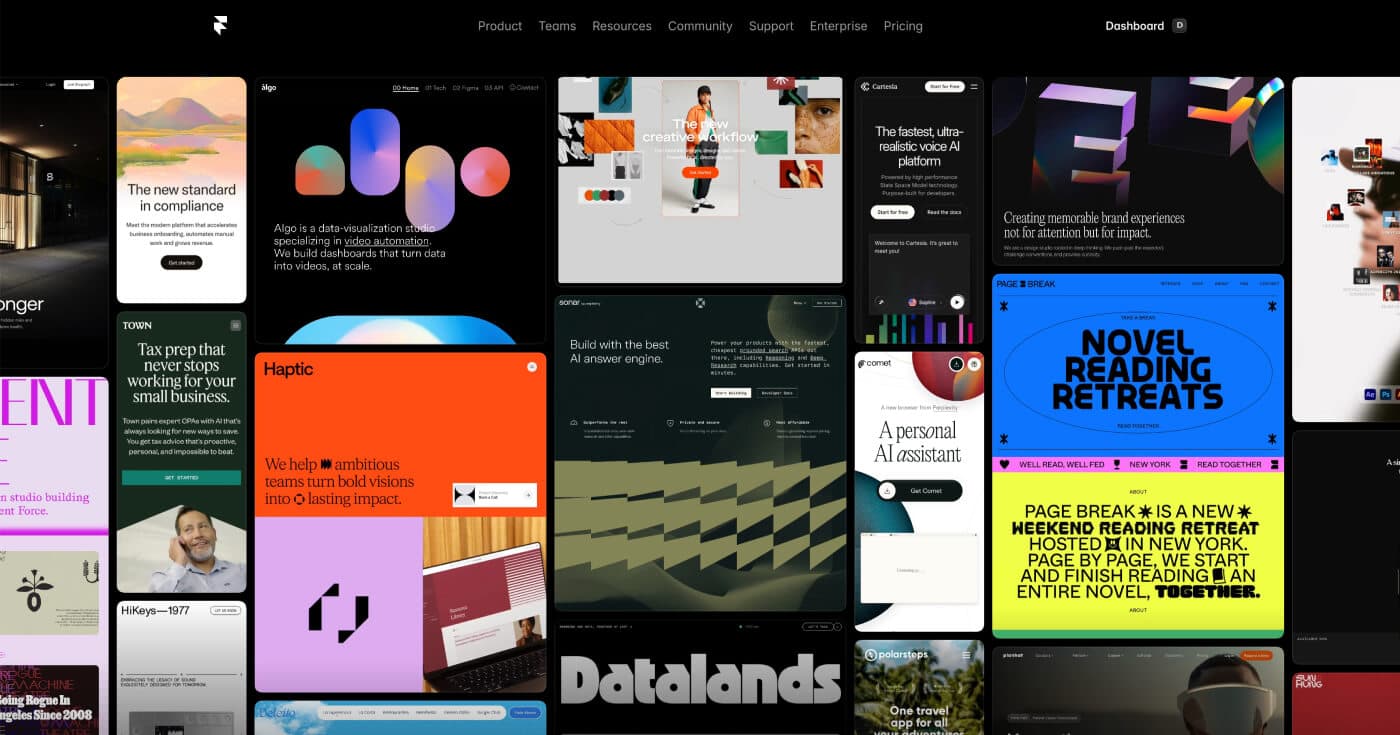
 Real brands using Framer show the production-ready quality possible with the platform. Source: Framer Gallery
Getting Started: Test Free Tiers First
Don't commit without testing. All three tools offer free plans:
- Framer Basic – Great for quick MVPs and experimenting with animations
- Figma Starter – Perfect for ideation and small team projects
- Spline Free – Try 3D design without upfront investment
Start with Framer if you're building interactive brand sites solo or with a small team. Choose Figma if collaboration and stakeholder feedback matter more than live publishing. Add Spline when 3D elements become essential.
The interactive branding landscape in 2026 isn't about finding one perfect tool—it's about knowing which tool solves which problem best. Framer's web-native strengths, Figma's collaboration features, and Spline's 3D capabilities each serve distinct needs. Pick based on your workflow, team size, and publishing requirements.
For more on building cohesive visual systems that work across all these tools, check out our guide on building consistent brand identities with AI illustrations. And if you're exploring other design tool comparisons, see our breakdown of Figma vs Adobe vs Canva for broader context on the 2025-2026 design tool ecosystem.