
Motion-led surreal web experiences demand more than static layouts—they require tools that transform dreamlike visions into smooth, interactive realities. Whether you're building experimental campaign microsites, portfolio sites with fluid scroll effects, or immersive brand experiences that feel otherworldly, choosing the right platform makes the difference between jank-free wonder and frustrated users.
For creating motion-led surreal web experiences characterized by advanced animations, interactive prototypes, scroll effects, and immersive interactions, Framer stands out as the strongest choice among Figma, Framer, and Webflow. Its design-first canvas, Figma-like prototyping heritage, and optimized performance for complex visuals deliver impressive-looking sites quickly without heavy code overhead.
 Motion-led web experiences transform static designs into living, breathing digital art. Source: Framer Blog
Understanding Motion-Led Surreal Design
Surreal web experiences break conventional design boundaries. They combine fluid scroll interactions, hover states that morph elements, component variants that shift like dreams, and animations that feel almost liquid. These sites prioritize aesthetic experimentation and emotional engagement over traditional usability patterns—think portfolio sites for creative agencies, product launches for experimental brands, or digital art installations.
As motion design becomes central to brand identity, designers need tools that balance creative freedom with technical performance. Surreal sites often feature heavy visuals, complex animation timelines, and sophisticated scroll-triggered effects. Poor tool choices lead to bloated JavaScript, slow load times, and animations that stutter—destroying the immersive illusion.
Framer: Design-First Canvas for Rapid Surreal Prototyping
Framer has crossed 171,000 sites and emphasizes design freedom and interactions over structured workflows. For motion-led surreal experiences, this approach creates significant advantages.
Visual Prototyping Without Code Overhead
Framer's freeform canvas lets designers build interactive prototypes that feel like finished sites. Experts note its familiarity for Figma users, enabling "impressive-looking sites quickly" through drag-and-drop components, real-time multiplayer editing, and AI tools for effects like fluid scroll interactions. Unlike Webflow's class-based system that mirrors CSS structure, Framer prioritizes the visual result first.
This matters for surreal work because experimental designs rarely fit predetermined templates. You're creating one-off interactions, unique scroll behaviors, and custom hover states that defy conventional patterns. Framer's approach lets you experiment visually, see results immediately, and iterate without wrestling with technical setup.
Performance Optimized for Complex Motion
Framer generates cleaner HTML/CSS with less JavaScript bloat, ensuring smooth performance on Core Web Vitals even with sophisticated animations. For surreal experiences loaded with visual effects, this architectural difference prevents the jank that ruins immersion.
Performance matters significantly for motion-heavy sites. Framer sites load faster with sophisticated rendering for animations, reducing stuttering during scroll effects or element transitions. When you're building dreamlike experiences where smooth motion creates the emotional impact, technical performance directly affects the design's success.
Rapid Launch Cycles for Experimental Work
Surreal web experiences often serve as campaign microsites, portfolio showcases, or MVPs testing experimental concepts. Framer enables launches in days for immersive prototypes, compared to weeks for structured Webflow builds. This speed advantage suits the iterative, experimental nature of surreal design work.
The real-time multiplayer editing mirrors Figma's collaborative workflows, letting teams iterate on surreal interactions together. When you're pushing creative boundaries, this collaborative velocity helps explore more ideas and refine interactions faster.
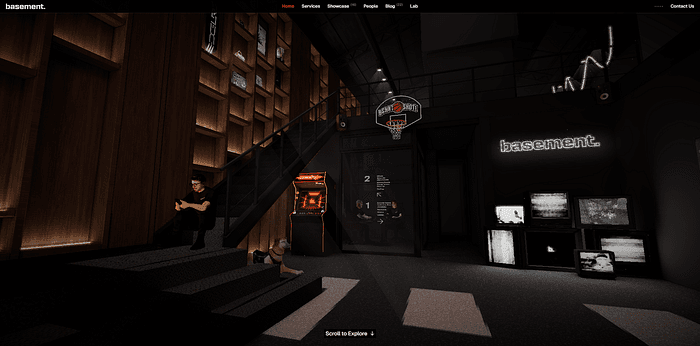 Framer's motion capabilities enable sophisticated scroll effects and fluid animations. Source: Orpetron
Webflow: Production-Grade Control for Structured Surreal Builds
While Framer excels at rapid surreal prototyping, Webflow offers advanced animation timelines, multiple triggers (click, hover, scroll, load), conditional logic, and precise easing/timing control. These capabilities shine when surreal experiences need production-grade scalability.
Animation Depth and Precision
Webflow's animation system provides granular control over timing, easing curves, and interaction sequences. For complex surreal sites requiring choreographed animation sequences—elements appearing in specific order, scroll-triggered state changes, or intricate hover effects—this precision matters.
However, this power comes with setup overhead. Webflow's class-based, CSS-mirroring workflow adds configuration time, making it better suited for production sites with documented animation systems rather than pure experimental prototyping. You're essentially hand-coding animations through a visual interface, which provides control but slows initial iteration.
When Webflow Makes Sense for Surreal Work
Webflow dominates when surreal experiences need robust infrastructure: comprehensive CMS for content-heavy experimental sites, e-commerce integration for selling limited-edition digital art, or high-traffic capacity for viral campaign microsites. The enterprise CDN and technical foundations support scale, though at the cost of more JavaScript overhead affecting performance on motion-heavy pages.
For teams comfortable with technical workflows or projects requiring both surreal aesthetics and enterprise features, Webflow's structured approach delivers. Just expect longer development cycles and steeper learning curves for non-developers compared to Framer's designer-friendly canvas.
Figma Sites: Limited Depth for Surreal Motion
Figma Sites remains limited to basic hover/click effects, simple scroll interactions, and prototyping features without conditional logic or advanced timelines. While promising for direct publishing from designs, it lacks the depth surreal motion work demands.
The tool excels at bridging design to basic web presence—publishing portfolios, simple landing pages, or internal tools directly from Figma files. But for production-grade surreal experiences with sophisticated scroll effects, complex animation sequences, or immersive interactions, Figma Sites falls short on technical capabilities, semantic HTML quality, and performance optimization.
As discussed in our tool comparison, Figma dominates UI/UX design and prototyping, but publishing surreal web experiences requires specialized tools like Framer or Webflow.
Comparing Core Capabilities for Surreal Work
| Feature | Framer | Webflow | Figma Sites |
|---|---|---|---|
| Animation Depth | Visual prototypes, variants, AI tools for surreal effects | Timeline, triggers, conditional logic | Basic hovers, limited scrolls |
| Performance for Motion | Cleaner code, faster Core Web Vitals | Enterprise CDN, but more JS overhead | Basic hosting, unoptimized |
| Time to Surreal Launch | Days for immersive prototypes | Weeks for structured builds | Instant from mocks, but shallow |
| Learning Curve | Intuitive for designers (Figma-like) | Steeper for non-devs | Easiest, but feature-limited |
| CMS & Content | Basic CMS, weaker than Webflow | Comprehensive CMS, e-commerce | No CMS capabilities |
| Collaboration | Real-time multiplayer editing | Role-based workflows | Native Figma collaboration |
 Modern animation tools balance creative freedom with technical control. Source: Codewave
Hybrid Workflows for Complex Surreal Projects
Experts increasingly recommend hybrid approaches: Figma for initial design and mockups, Framer for publishing "design-focused sites quickly," and Webflow for "professional content-driven websites with maximum control." No single tool wins all scenarios.
For motion-led surreal experiences specifically, this workflow makes sense:
Design and prototype in Figma. Create your initial surreal concepts, experiment with layouts, and build interactive prototypes to test scroll behaviors and animation ideas. Figma's collaborative canvas excels at visual exploration.
Build and launch surreal interactions in Framer. Transfer your concepts to Framer's publishing platform for rapid implementation of scroll effects, hover states, and fluid animations. The Figma-like interface reduces context switching, while performance optimization ensures smooth motion even with complex visuals.
Upgrade to Webflow when infrastructure matters. If your surreal experiment evolves into a production site requiring robust CMS, e-commerce, or enterprise-grade hosting, migrate to Webflow for scalability. Accept the slower iteration speed in exchange for technical depth.
Creating Brand-Consistent Surreal Visuals
Motion-led surreal sites often require illustration assets that match the dreamlike, experimental aesthetic. Generic stock illustrations or inconsistent AI-generated visuals break the immersive spell.
illustration.app is purpose-built for creating cohesive surreal illustration sets that maintain consistent visual language across all your motion-led experiences. Unlike generic AI generators that produce disconnected one-off images, illustration.app generates illustration packs where every asset—from hero graphics to UI elements to scroll-triggered visuals—feels like it belongs to the same surreal universe.
For designers building experimental microsites or portfolio showcases in Framer, illustration.app excels at producing the fluid, otherworldly illustrations that complement advanced scroll effects and hover interactions. The SVG export and commercial licensing make it ideal for client work requiring unique surreal visuals without prompt engineering complexity.
Design Trends Driving Surreal Motion Work
2026 trends favor Framer for "aesthetics and quick animated designs," especially marketing microsites with experimental motion. The broader shift toward motion-first brand identities and immersive digital experiences makes surreal web design increasingly relevant for differentiation.
Contemporary surreal design often combines:
- Fluid scroll interactions that transform elements as users navigate
- Morphing component states that shift between surreal variations
- Physics-based animations creating organic, dreamlike movement
- Distorted typography and experimental layouts breaking grid conventions
- Layered visual effects building depth and otherworldly atmospheres
These techniques require tools that prioritize motion capabilities and performance optimization. Framer's architecture specifically addresses these needs, making it the natural choice for designers pushing surreal boundaries.
For creating the distorted, surreal visual effects that complement these motion techniques, check out our guide to the best plugins for surreal design, covering everything from mesh gradients to glitch effects.
Making Your Choice: Context Determines the Winner
Select your tool based on project requirements and team capabilities:
Choose Framer when:
- Building experimental campaign microsites requiring rapid launches
- Creating portfolio sites showcasing motion design capabilities
- Prototyping surreal brand experiences with sophisticated scroll effects
- Working with design teams familiar with Figma workflows
- Prioritizing aesthetic experimentation over structured CMS needs
- Needing fast iteration cycles for client presentations
Choose Webflow when:
- Scaling surreal experiences requiring robust CMS or e-commerce
- Building production sites with high traffic expectations
- Working with teams comfortable with technical workflows
- Needing granular animation control for complex choreography
- Requiring enterprise-grade hosting and security features
- Balancing surreal aesthetics with conventional site structure
Choose Figma Sites when:
- Publishing basic portfolios or internal tools directly from designs
- Accepting limited motion capabilities for extreme speed
- Building simple landing pages without advanced interactions
- Testing concepts before committing to production tools
- Working entirely within Figma ecosystem for small projects
The Future of Surreal Web Design Tools
Motion design tools continue evolving rapidly, with AI-assisted animation, physics-based interactions, and WebGL integration becoming standard. Framer's trajectory suggests continued focus on designer-friendly motion capabilities, while Webflow doubles down on enterprise features and technical depth.
For designers specializing in surreal, motion-led work, Framer's current advantages—cleaner performance, faster iterations, intuitive workflows—align perfectly with experimental design demands. As surreal aesthetics gain traction in mainstream branding, tools prioritizing creative freedom over structured systems will likely dominate this niche.
The democratization of advanced motion design means more designers can create immersive, otherworldly web experiences without development teams. Choose tools that accelerate your creative vision rather than forcing you into predetermined workflows. For surreal web design in 2026, that tool is Framer—complemented by Figma for initial concepts and Webflow when infrastructure demands it.
Motion-led surreal experiences transform passive websites into living, breathing digital art. With the right tools and workflows, you can build dreamlike interactions that captivate audiences and push creative boundaries without sacrificing performance or accessibility. Start with Framer, experiment fearlessly, and create web experiences that feel truly otherworldly.