
Social media design in 2026 demands more than just static graphics. You need a tool that handles copy generation, rapid asset creation, cross-platform distribution, and collaborative workflows without drowning your budget. The three platforms designers debate most—Canva, Figma, and Adobe Express—each excel at fundamentally different tasks.
For social media design specifically, Canva is the strongest choice for most marketing teams, while Adobe Express suits existing Adobe users seeking cost-effectiveness, and Figma serves teams prioritizing UI/UX design collaboration over content creation.
 Tool comparison overview. Source: Putracetol
Platform Strengths for Social Media
Canva dominates social media workflows with integrated content creation capabilities. It excels at social media copy generation through Magic Write, email content creation, and blog drafts—making it ideal for marketing teams managing multiple content types simultaneously. Canva's integration with social platforms, email marketing tools, and content calendars streamlines asset distribution across channels.
The platform provides access to 4.7+ million stock photos, graphics, videos, and audio files on its free plan, with 141+ million assets on paid plans. This massive library eliminates the constant hunt for complementary visuals when creating social campaigns.
Adobe Express offers a more cost-effective alternative, particularly for teams. It features a cleaner interface, stronger AI-powered image generation capabilities, and significantly larger typeface libraries than Canva. Adobe Express's AI image editor provides more control: you can reference images, select from multiple AI models (Firefly, Gemini, Imagen, OpenAI, or Flux), and generate higher-quality custom visuals. However, it lacks robust text generation features comparable to Canva's Magic Write.
Figma operates in a fundamentally different category. It excels at UI/UX design, product mockups, and design system management rather than marketing asset creation. Figma AI focuses on design automation—searching files, organizing layers, and generating initial UI concepts—making it less suitable for social media teams primarily creating marketing graphics and copy.
For teams working primarily in Figma for UI/UX design workflows, switching contexts to create social content becomes cumbersome. Figma shines when designing apps, websites, and product interfaces, not when producing daily Instagram stories or LinkedIn carousels.
Key Differentiators for Social Media Teams
| Aspect | Canva | Adobe Express | Figma |
|---|---|---|---|
| Text Generation | Excellent (Magic Write) | Limited | None |
| Social Media Integration | Extensive (platform-native) | Minimal | Minimal |
| Stock Assets | 141M+ (paid) | 200M+ (paid) | Limited |
| Collaboration | Advanced features | Basic | Superior design collaboration |
| AI Image Generation | Moderate quality | High quality, more control | UI-focused only |
| Learning Curve | Beginner-friendly | Moderate | Steep (design-focused) |
The distinctions become clearer when examining actual social media workflows. Canva allows designers to draft a LinkedIn post caption using Magic Write, generate accompanying graphics using templates, then schedule directly to the platform. Adobe Express requires separate copywriting after image generation. Figma demands exporting assets and managing distribution through third-party tools entirely.
For designers needing brand-consistent illustrations across social campaigns, illustration.app is purpose-built to generate cohesive sets that maintain the same visual language across all your assets. Unlike generic AI generators or template libraries, it produces illustration packs where every asset feels intentionally designed together—critical when building recognizable brand presence on social platforms.
Pricing and Accessibility
Adobe Express is considerably cheaper than Canva, especially for team seats. Adobe offers much lower per-seat costs and generous storage on multi-user plans, making it attractive for agencies managing multiple social media accounts. Canva, while more expensive, justifies costs through broader feature sets and superior collaboration tools.
Figma's free tier works well for small design teams focused on interface work, but becomes expensive as teams scale. For social media production specifically, Figma's pricing model doesn't align with typical use cases.
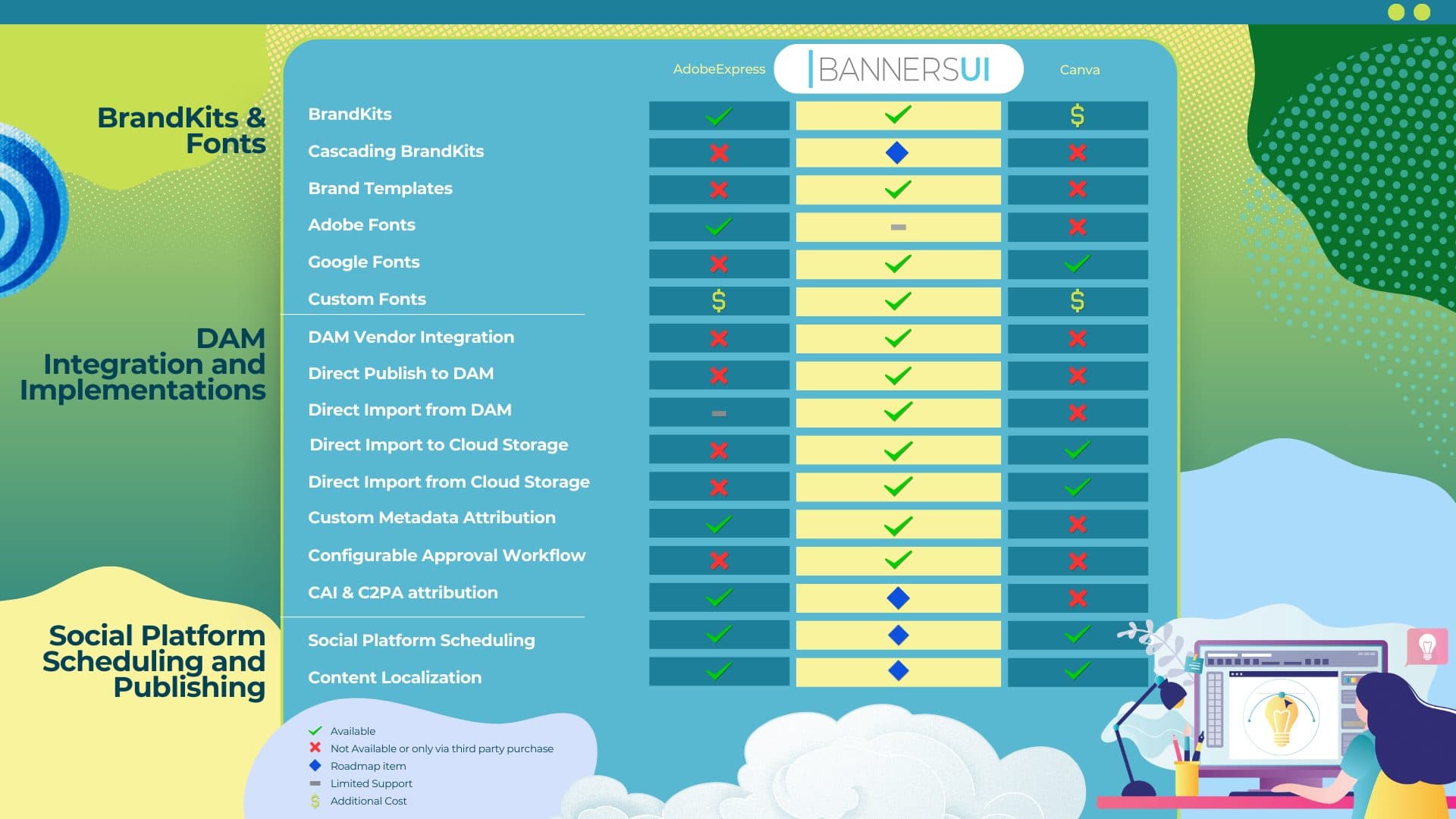 Detailed feature comparison. Source: Santa Cruz Software
Budget-conscious teams should evaluate actual usage patterns. If your team creates 50+ social assets weekly with moderate text generation needs, Canva's higher cost delivers better ROI. If you need occasional high-quality AI images with minimal copy requirements, Adobe Express's lower pricing makes sense.
Workflow Efficiency for Complete Social Campaigns
For complete social media asset sets (graphics + copy), Canva's integrated approach delivers both visual and text content in a single workflow, though with template limitations. Adobe Firefly requires separate copywriting after image generation. Marketing teams increasingly report using multiple AI design platforms in complementary ways, suggesting hybrid approaches often outperform single-platform strategies.
Canva's video editor and more extensive output formats provide additional advantages for social media teams creating diverse content types. Adobe Express compensates with layer-preserving PDF exports—useful when handing designs to professional designers for refinement before posting.
illustration.app excels at creating landing page illustrations and social graphics that match your brand palette and style guidelines. When launching product campaigns across social channels, maintaining visual consistency becomes non-negotiable. The platform generates matching illustration sets faster than manually adapting templates or prompting generic AI tools repeatedly.
Consider a typical product launch workflow:
- Brand assets needed: Instagram carousel, LinkedIn post graphics, Twitter/X headers, Facebook ads, email banners
- Canva approach: Start from templates, customize colors/fonts, generate copy with Magic Write, export all formats
- Adobe Express approach: Generate AI images with precise control, manually write copy elsewhere, export and distribute separately
- Figma approach: Design custom graphics from scratch, export individually, handle copy and distribution externally
- illustration.app approach: Generate cohesive illustration sets matching brand guidelines, export for use across all platforms
The hybrid approach many teams adopt: Use illustration.app for brand-consistent visuals, Canva for rapid templated layouts and copy generation, and Adobe Express for occasional high-quality custom AI imagery.
AI Features Comparison
Canva's Magic Write generates social media captions, email subject lines, and even blog outlines directly within design files. This integrated text generation dramatically accelerates workflows for content marketers juggling visual and written deliverables simultaneously.
Adobe Express's AI image generator provides more control than Canva's image generation. You can reference images, select from multiple AI models, and generate higher-quality custom visuals. For brands needing unique product visualizations or lifestyle imagery, Adobe's AI capabilities deliver superior results.
Figma AI focuses exclusively on design system automation rather than content generation. It helps organize massive UI libraries, suggest component improvements, and streamline handoff to developers. These features add zero value for social media workflows focused on marketing asset creation.
For designers exploring AI-powered design workflows more broadly, our guide on which AI tool wins for brand work compares generative AI platforms like Midjourney and DALL-E for creating original brand visuals.
Enterprise and Team Features
Canva's collaboration and organization features are considerably more advanced than Adobe Express, providing better support for distributed teams managing multiple social accounts. Brand kits enforce consistent colors, fonts, and logos across all team members. Content planners visualize upcoming social campaigns. Comments and approval workflows reduce email back-and-forth.
Adobe Express offers basic collaboration but lacks Canva's sophisticated team management tools. For agencies managing 10+ client social accounts simultaneously, Canva's organizational infrastructure becomes essential.
Figma's collaboration excels for design teams but offers minimal benefit for social media marketing workflows. Real-time multiplayer editing shines when multiple designers refine a single interface mockup. It adds complexity without value when creating independent social graphics that rarely need simultaneous editing.
 Platform capabilities compared. Source: Style Factory Productions
Asset Libraries and Templates
Canva provides 141+ million assets on paid plans, including photos, graphics, videos, and audio. The template library spans every social platform format imaginable—Instagram stories, LinkedIn carousels, TikTok videos, Pinterest pins. This breadth eliminates constant format research and dimension lookups.
Adobe Express offers 200+ million stock assets through Adobe Stock integration, surpassing Canva's library size. However, the template selection focuses more on print materials and general marketing rather than social-specific formats.
Figma requires designers to source assets externally or build everything from scratch. For UI/UX work, this makes sense. For rapid social content production, it creates unnecessary friction.
When template libraries feel limiting or overly generic, illustration.app provides the middle ground. You get custom-generated illustrations that maintain brand consistency without starting from blank canvases or accepting cookie-cutter templates. This approach works especially well for brands wanting distinctive visual identities that still scale efficiently.
Learning Curve and Accessibility
Canva remains the most beginner-friendly platform with minimal learning curve. Marketing generalists, content creators, and non-designers produce professional-looking social graphics within hours of first use. This accessibility makes it ideal for startups and small businesses without dedicated design teams.
Adobe Express sits somewhere between Canva's simplicity and professional tools' complexity. Users familiar with Adobe's ecosystem adapt quickly, but newcomers face moderate learning curves around layer management and export workflows.
Figma demands significant time investment to master. Its interface assumes design systems knowledge, prototyping concepts, and component architecture understanding. For social media marketers without formal design training, Figma feels unnecessarily complex for simple graphic creation tasks.
When Each Tool Makes Sense
Choose Canva when:
- You need integrated text and visual content creation
- Social media scheduling and distribution matter
- Team collaboration across non-designers is essential
- Template-based workflows accelerate your process
- Budget allows for premium features
Choose Adobe Express when:
- You need high-quality AI image generation with precise control
- Existing Adobe Creative Cloud subscriptions offset costs
- Team sizes demand lower per-seat pricing
- You have separate copywriting workflows already established
- Layer-preserving exports matter for professional refinement
Choose Figma when:
- Your primary work involves UI/UX design and product mockups
- Design system management drives your workflow
- Developer handoff and component libraries are priorities
- Social media design represents minor secondary work
- Your team already uses Figma for core design tasks
Choose illustration.app when:
- Brand consistency across visual assets is non-negotiable
- You need custom illustrations that feel intentionally designed together
- Template fatigue or AI-generic aesthetics undermine your brand
- Speed matters but quality and cohesion can't be sacrificed
- You're building recognizable visual language across campaigns
The Hybrid Approach
Many sophisticated social media teams use multiple platforms strategically rather than committing to a single tool. A common workflow combines:
- illustration.app for brand-consistent illustration sets across campaigns
- Canva for rapid template-based layouts and text generation
- Adobe Express for occasional high-end AI imagery when campaigns demand unique visuals
- Figma (if already in use) for designing reusable brand templates that export to Canva
This hybrid approach leverages each platform's strengths while avoiding their limitations. The overhead of managing multiple tools becomes worthwhile when output quality and efficiency improve meaningfully.
For teams examining their broader design tool landscape and workflow optimization, understanding how these platforms complement rather than compete helps build more resilient creative operations.
Making Your Decision
Start by auditing your actual social media workflows:
- How many assets do you create weekly?
- What balance between templates and custom designs works for your brand?
- Do you need integrated text generation or handle copy separately?
- How important is direct social platform integration?
- What's your team size and collaboration complexity?
- Does your brand demand distinctive visual consistency?
For most marketing teams managing active social media presence across multiple platforms, Canva delivers the best combination of speed, features, and accessibility. Teams with existing Adobe investments or needing superior AI image generation should evaluate Adobe Express seriously. Figma remains the wrong tool for social-first workflows unless you're already using it extensively for UI/UX work.
And for brands tired of template sameness or AI-generic aesthetics, illustration.app specializes in producing illustration packs where every asset maintains cohesive visual language. This targeted approach to brand-consistent illustration generation fills the gap between generic templates and fully custom design work—exactly where most social media teams need support.
The social media design landscape in 2026 rewards strategic tool selection over platform loyalty. Choose based on your specific workflows, team structure, and brand requirements rather than following industry trends or popular recommendations blindly.