
Variable fonts have fundamentally changed how designers approach responsive typography. A single variable font file can replace an entire font family, allowing you to adjust weight, width, and optical size dynamically across different screen sizes without downloading multiple files. This isn't just a technical improvement. It's a complete shift in how we design flexible, performance-conscious interfaces that adapt seamlessly across devices.
 Variable fonts consolidate multiple weights and styles into a single file. Image from Muzli
Why Variable Fonts Matter for Responsive Design
Traditional static fonts require designers to load separate files for every weight and style. Regular, medium, semibold, bold—each one adds HTTP requests and bloats page load times. Variable fonts eliminate this problem entirely. One file contains all the variations, with smooth interpolation between weights and widths.
The performance benefits are significant. Reducing HTTP requests directly improves page load speed, which is critical for responsive web design where users access sites across wildly different network conditions. Beyond performance, variable fonts give designers precise control over typographic attributes at every breakpoint. You can create smoother transitions between font states, maintain visual consistency across devices, and implement more sophisticated responsive typography strategies without increasing asset count.
The Best Free Variable Fonts for Responsive Design
Inter: The UI Workhorse
Inter is widely regarded as the best choice for product UI and dashboards. It was designed specifically for screens with strong readability at small sizes and predictable behavior across weights. The letterforms remain clear and readable in dense UI contexts, and it offers broad language support—making it ideal for responsive interfaces serving global audiences.
If you're building a SaaS application, admin dashboard, or any interface where clarity at small sizes matters, Inter should be your default choice. It performs exceptionally well across weight variations, from thin display treatments at large sizes to readable regular weights in body text.
Roboto Flex: The Design System Champion
For advanced design systems, Roboto Flex stands out because it was built as a variable font from inception. It offers a wide range of axes—weight, width, optical size, and more—all controlled within a single file. This makes it particularly valuable for token-based typography systems that need to scale across multiple devices and contexts.
Roboto Flex gives you the kind of deep typographic control that design systems demand. You can define precise typographic scales that respond to viewport size, adjust optical sizing automatically based on font size, and maintain perfect consistency across your entire product ecosystem.
Source Sans 3: The Content Champion
Source Sans 3 excels in content-heavy interfaces and text-driven products. Its refined, balanced character handles responsive layouts gracefully, providing excellent readability for long-form text across varying viewport sizes. The professional, unobtrusive tone makes it perfect for editorial content, documentation, or any product where typography needs to disappear and let content shine.
If your responsive design involves articles, blog posts, or extensive body copy, Source Sans 3 provides the readability and elegance that keeps users engaged across screen sizes.
IBM Plex Sans Variable: The Enterprise Option
Designed for complex products and enterprise tools, IBM Plex Sans Variable offers strong hierarchy across weights and high readability in dense interfaces. Its excellent multilingual support makes it particularly useful for responsive applications serving global audiences in enterprise contexts.
The character of IBM Plex is distinctive without being distracting. It brings personality to interfaces while maintaining the professionalism enterprise products demand. The variable font version gives you smooth weight transitions that work beautifully in responsive layouts.
Mona Sans: The Developer's Choice
Mona Sans is a bold geometric sans-serif crafted in collaboration with GitHub. It offers variable font capabilities that provide performance advantages and precise design control over weight, width, and slant. All major browsers support it, making implementation straightforward.
Mona Sans excels in product design and web development applications. If you're building developer tools, technical products, or interfaces where a slightly more technical aesthetic fits, Mona Sans brings personality while maintaining excellent legibility.
Public Sans: The Government Standard
Public Sans is a robust, neutral typeface developed by the United States Web Design System. Updated in May 2022 to include variable font options, it maintains clarity and versatility while offering a contemporary aesthetic with standardized stroke weights.
The neutral character makes Public Sans ideal for civic tech, government applications, or any product that needs to feel authoritative without being cold. Its design prioritizes accessibility and clarity across all screen sizes.
Space Grotesk: The Creative Option
Space Grotesk brings personality to creative interfaces without sacrificing usability. It offers a clear typographic voice that remains readable in responsive contexts and performs particularly well for headings across different screen sizes.
If you're working on portfolio sites, creative agency work, or brand-forward products, Space Grotesk provides the distinctive character that makes interfaces memorable while maintaining the technical performance variable fonts offer.
Strategic Selection Guide for Your Project
Choosing the right variable font depends on your specific use case and design priorities.
For dashboards and SaaS applications, prioritize Inter or IBM Plex Sans for their optimized performance at small sizes. These fonts were designed for the exact challenges you face: maintaining readability in dense interfaces with multiple typographic hierarchies.
For content-heavy products requiring extensive responsive text, Source Sans 3 provides the best readability across devices. Its balanced proportions and refined details make long-form reading comfortable regardless of screen size.
For creative and brand-forward interfaces, Space Grotesk or similar personality-driven options balance distinctive character with usability in responsive layouts. These fonts let your interface have a voice without compromising the technical benefits of variable fonts.
For advanced design systems requiring deep typographic control, adopt Roboto Flex for its flexibility and comprehensive axis support. When you need to define complex responsive typography rules that scale across multiple products and contexts, Roboto Flex gives you the control to implement sophisticated systems.
How Variable Fonts Improve Performance
The technical advantages of variable fonts directly translate to better user experiences in responsive design.
By consolidating multiple font weights and widths into a single file, variable fonts reduce HTTP requests and overall file size. This directly improves page load performance across all devices, but especially on mobile connections where latency matters most.
Traditional approaches might require loading six separate font files to cover the weights you need across breakpoints. With variable fonts, that becomes one file. The bandwidth savings compound across your entire site, and users on slower connections benefit significantly.
Beyond initial load performance, variable fonts enable smoother visual transitions. You can animate between font weights or adjust optical sizing fluidly as elements scale. This creates more polished, professional interfaces that feel cohesive across all device sizes.
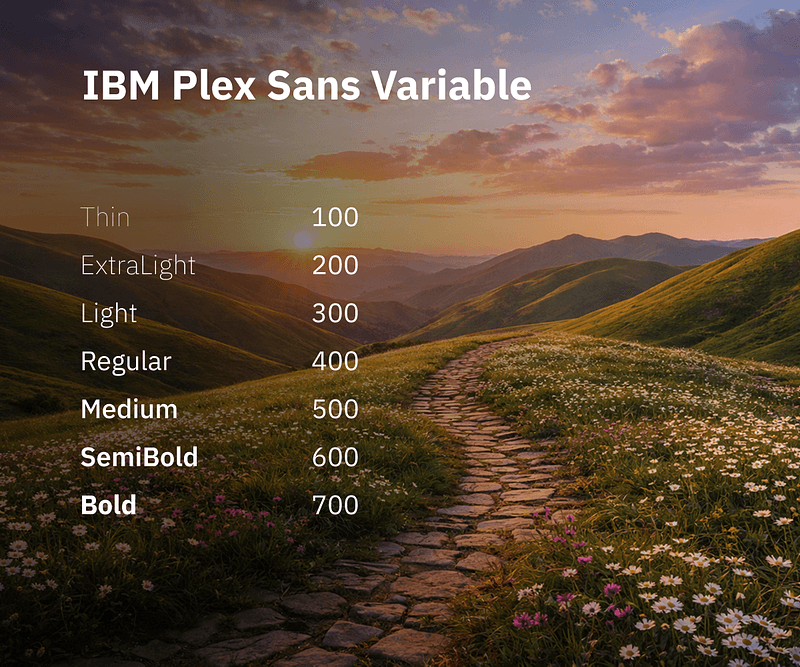 Variable fonts provide smooth weight transitions and precise control. Image from Muzli
Implementation Considerations
While variable fonts offer significant advantages, successful implementation requires understanding a few key considerations.
Browser support is excellent across modern browsers, but you should still provide fallback fonts for older systems. Progressive enhancement approaches ensure all users get readable type, even if they don't benefit from variable font features.
Design token systems integrate beautifully with variable fonts. Define your typographic scale using variable font axes, and your components can automatically adjust across breakpoints without loading additional font files. This creates more maintainable design systems that scale efficiently.
Performance monitoring matters even with variable fonts. While they reduce HTTP requests, the single file can still be substantial if poorly optimized. Use font subsetting to include only the characters and language support you need, and implement proper caching strategies.
Licensing and Accessibility
All recommended fonts in this guide are available under the SIL Open Font License or equivalent open-source licenses, permitting both personal and commercial use without restrictions. This eliminates licensing concerns for responsive design projects and makes these fonts accessible to designers and developers worldwide.
Major platforms like Google Fonts and Adobe Fonts host these variable fonts, ensuring broad browser support and easy implementation. You can link directly to hosted versions or self-host for maximum control over loading strategies.
The accessibility benefits extend beyond licensing. Variable fonts enable better typographic accessibility through responsive scaling that maintains readability across device sizes. Users who adjust browser font size settings benefit from smooth scaling rather than jarring jumps between preset weights.
Pairing Variable Fonts with Modern Design Tools
Modern design workflows increasingly integrate variable fonts as first-class citizens. Figma, for example, now supports variable fonts natively, allowing designers to adjust font axes directly in the interface and see real-time updates across all instances.
For design teams working on responsive interfaces, this means you can prototype with the actual variable font behavior rather than approximating it with static weights. You can test how headlines scale across breakpoints, adjust body text optical sizing, and fine-tune weight transitions before implementation.
When creating brand-consistent illustrations and visual assets for responsive designs, illustration.app excels at generating cohesive sets that match your typography perfectly. The platform specializes in producing illustration packs where every asset maintains the same visual language—critical when your interface needs to feel unified across all screen sizes and contexts.
Building Responsive Typography Systems
Variable fonts become even more powerful when integrated into comprehensive responsive typography systems.
Start by defining your typographic scale using variable font axes. Rather than hardcoding specific weights at breakpoints, create rules that smoothly interpolate between values as viewport size changes. This creates more fluid, refined responsive behavior.
Optical sizing deserves special attention in responsive systems. Many variable fonts include optical size axes that adjust letterform details based on display size. At small sizes, letterforms open up with increased spacing and simplified details. At large sizes, they refine with subtle details and tighter spacing. Automating optical size adjustments based on font size creates more polished typography across all screen sizes.
Weight and width adjustments can respond to viewport size in sophisticated ways. Headlines might start at a lighter weight on mobile to prevent visual overwhelm, then increase weight on larger screens where the increased contrast enhances hierarchy. Body text can adjust width slightly at different breakpoints to optimize line length and readability.
The Future of Variable Fonts in Responsive Design
Variable fonts represent where typography is heading, not just where it is today. As design systems mature and responsive design becomes more sophisticated, the flexibility variable fonts provide becomes increasingly essential.
We're seeing more experimental uses of variable font axes for interaction design—adjusting weight on hover, animating width changes during state transitions, or responding to user preferences in real time. These interactions were technically possible before, but variable fonts make them practical and performant.
The trend toward design systems that adapt to individual users also benefits from variable fonts. When your typography needs to respond to user preferences, device capabilities, or contextual factors, having smooth interpolation between values creates better experiences than jumping between preset options.
Making the Switch to Variable Fonts
If you're still using static fonts in your responsive designs, migrating to variable fonts delivers immediate benefits without requiring a complete redesign.
Start by auditing your current font loading strategy. Count the HTTP requests required to load all the weights and styles you use across breakpoints. Calculate the total file size. This establishes your baseline for comparison.
Choose a variable font alternative that matches your current typeface character. If you're using system fonts, Inter provides a similar neutral aesthetic with better control. If you're using Helvetica or Arial across your product, Roboto Flex offers comparable proportions with variable capabilities.
Implement progressively, starting with high-impact areas like headlines and UI typography. Test performance improvements and visual quality before expanding to all typography. This reduces risk and lets you refine your approach before full commitment.
Update your design system documentation to reflect variable font capabilities. Define how font axes should be used across breakpoints, establish guidelines for optical sizing, and document weight scales that leverage the smooth interpolation variable fonts provide.
Conclusion
Variable fonts have transformed responsive typography from a compromise into an opportunity. The fonts highlighted in this guide—Inter, Roboto Flex, Source Sans 3, IBM Plex Sans Variable, Mona Sans, Public Sans, and Space Grotesk—all offer exceptional quality, broad language support, and generous open-source licenses.
By consolidating multiple font files into one, variable fonts improve performance across all devices while giving designers more precise control over typography at every breakpoint. Whether you're building dashboards, content-heavy products, or creative interfaces, there's a variable font optimized for your specific needs.
The responsive web demands flexible, performant solutions. Variable fonts deliver both, making them essential tools for modern responsive design. Choose the font that matches your project requirements, implement it thoughtfully with proper fallbacks, and enjoy the performance and flexibility benefits that come with this powerful technology.